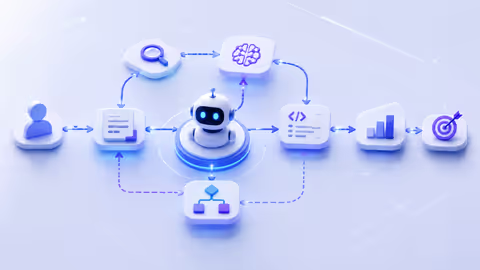
Businesses are drowning in repetitive tasks that need judgment calls at every turn. Traditional automation handles the simple stuff — but what happens when your workflow needs to think, adapt, and make decisions across multiple steps? That's where agentic workflows come in.
These systems don't just follow scripts. They deploy AI agents that can reason through problems, use tools, and coordinate with each other to get complex work done. Think of them as your digital workforce that actually understands context.
The shift is already happening. Companies that once needed armies of people to process claims, route support tickets, or analyze research data are now watching AI agents handle the heavy lifting. And we're not talking about basic if-then automation anymore.
Understanding Agentic Workflows in AI Systems
An agentic workflow is a process where autonomous AI agents make decisions, take actions, and complete tasks with minimal human intervention. Unlike traditional automation that follows rigid rules, these workflows adapt to changing conditions and handle exceptions without breaking down.
The "agentic" part matters. It means the AI has agency — the ability to choose actions based on goals rather than just executing predefined steps. When a customer email comes in, an agentic workflow doesn't just categorize it. The agent reads it, determines intent, checks relevant systems, decides on the best response, and either handles it or routes it to the right specialist with full context.
Core components set agentic workflows apart from what came before:
Perception and reasoning. The agent understands unstructured inputs — emails, documents, images, voice — and figures out what needs to happen. It's not matching keywords. It's comprehending meaning.
Tool use. Agents can call APIs, query databases, run calculations, or trigger other systems. They know which tools solve which problems and when to use them.
Memory and context. An agentic workflow remembers what happened earlier in the process. It builds on previous steps instead of treating each action in isolation.
Decision-making authority. The agent chooses the next action based on outcomes, not just predetermined paths. If plan A fails, it tries plan B without human intervention.
The next wave of AI applications won't just assist with tasks — they'll own entire workflows from start to finish, making autonomous decisions that previously required human judgment at every step.
— Ng Andrew
Traditional automation breaks the moment something unexpected happens. Your rule-based system sees an invoice format it doesn't recognize? It fails. An agentic workflow? It figures it out, extracts the data anyway, and flags anything uncertain for review.
The pattern I see most often is companies trying to force agentic approaches onto simple tasks. You don't need an AI agent to send a confirmation email. But when your process involves judgment, context, and multiple decision points? That's when agentic workflows shine.
How AI Agent Orchestration Powers Multi-Step Processes
AI agent orchestration is the coordination layer that manages how multiple agents work together on complex tasks. One agent rarely handles everything. Instead, specialized agents tackle different parts of the workflow, passing work between them as needed.
Here's how it actually works. A customer submits a complex insurance claim. The intake agent validates the submission and extracts key data. It then hands off to a fraud detection agent that analyzes patterns and risk factors. If cleared, a processing agent calculates coverage and determines payout. A final agent generates the settlement letter and updates all relevant systems.
Each agent brings specific capabilities. They don't all need to know everything — they just need to know their job and how to communicate with other agents.
Author: Damien Crowhurst;
Source: aleanetwork.net
Handoffs are where orchestration matters most. When one agent completes its task, it needs to pass the right context to the next agent. Not everything — just what's relevant. The fraud detection agent doesn't need the customer's full claim history. It needs the current claim data, recent patterns, and policy details.
Smart orchestration systems use a few key mechanisms:
Routing logic determines which agent handles what. This can be rule-based (claims under $5,000 go to the fast-track agent) or dynamic (the orchestrator assigns based on current agent availability and expertise).
State management tracks where the workflow is, what's been completed, and what's pending. If an agent fails or gets stuck, the orchestrator knows exactly where to resume or how to route around the problem.
Parallel processing lets multiple agents work simultaneously when tasks don't depend on each other. While one agent verifies customer identity, another can be pulling policy details and a third can start preliminary risk assessment.
The real power shows up in multi-step AI workflows that adapt in real-time. Say your data enrichment workflow normally pulls information from three sources. If one source is down, the orchestrator routes to backup sources or adjusts confidence thresholds. The workflow doesn't fail — it adapts.
Decision-making happens at two levels. Individual agents make tactical decisions within their domain. The orchestrator makes strategic decisions about workflow routing and resource allocation. This separation keeps things manageable.
A common mistake is building monolithic agents that try to do everything. They become slow, expensive to run, and hard to debug. Better approach? Smaller, focused agents orchestrated well. Your customer service workflow might use separate agents for intent classification, knowledge retrieval, response generation, and quality checking.
The orchestration layer also handles error recovery. When an agent returns an uncertain result, the orchestrator might route to a human reviewer, trigger a secondary verification agent, or adjust downstream processing based on confidence scores.
Key Components of Agentic Process Automation
Agentic process automation requires specific technical building blocks that work together. You can't just plug in an LLM and call it done. The architecture needs structure.
Triggers initiate workflows. These can be events (a new email arrives), schedules (run every morning at 9 AM), or conditions (inventory drops below threshold). Unlike traditional automation, agentic triggers can be semantic — "when a customer expresses frustration" rather than "when an email contains the word 'angry'."
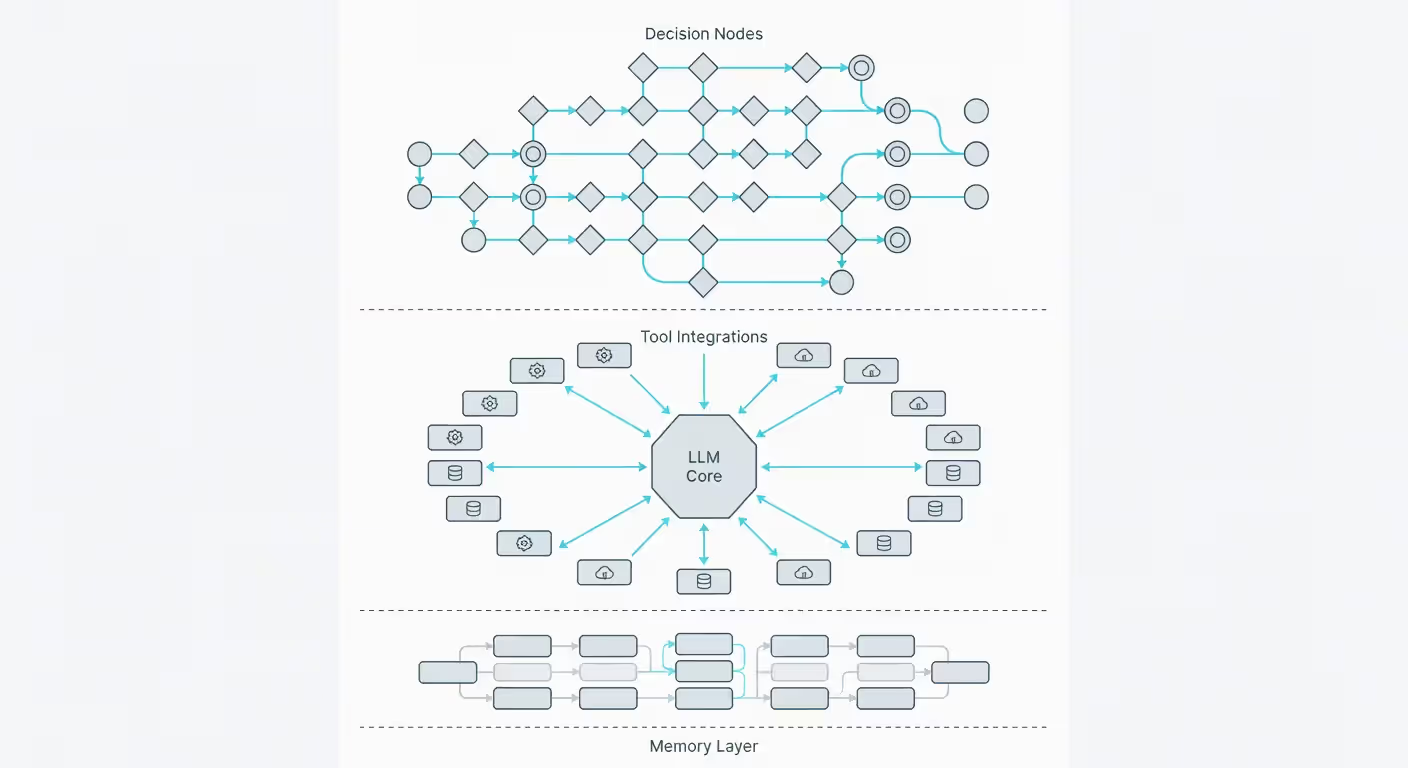
The agent core is usually built on large language models that provide reasoning capabilities. But LLM workflow automation isn't just about the model. You need prompt engineering, context management, and output validation wrapped around it. The LLM interprets situations and decides actions. Everything else ensures those decisions happen reliably.
Decision nodes are points where the agent chooses between paths. These aren't simple if-then branches. The agent evaluates multiple factors, weighs options, and selects the best course of action. A content moderation agent might decide whether to auto-approve, flag for review, or reject based on confidence levels, policy risk, and content context.
Tool integration gives agents hands and eyes. The agent can't do anything useful without the ability to interact with systems. This means:
API connectors to external services
Database query capabilities
File system access for reading and writing documents
Calculation and data transformation functions
Communication interfaces (email, Slack, SMS)
The agent decides which tool to use and when. It's not following a predetermined sequence.
Author: Damien Crowhurst;
Source: aleanetwork.net
Memory systems come in two flavors. Short-term memory holds context for the current workflow execution — what's happened so far, what data has been collected, what decisions have been made. Long-term memory stores patterns, learnings, and historical data that inform future decisions. An agent that processes support tickets gets better over time because it remembers what worked before.
Validation and guardrails prevent the agent from going off the rails. You set boundaries: budget limits, approval requirements, prohibited actions, data access restrictions. The agent operates autonomously within those boundaries. When it hits a limit, it either stops and requests approval or routes to an exception handler.
Monitoring and observability track what agents are doing and why. You need logs that capture not just actions but reasoning. When an agent makes an unexpected decision, you want to see the chain of thought that led there. This isn't just for debugging — it's for building trust and meeting compliance requirements.
The technical stack varies, but most agentic process automation systems use:
An LLM provider (OpenAI, Anthropic, or open-source models)
An orchestration framework (LangChain, AutoGen, or custom)
A workflow engine for state management
Vector databases for semantic memory
Standard APIs and integration middleware
One piece that's often overlooked: feedback loops. Agents need mechanisms to learn from outcomes. When an agent's decision leads to a good result, that reinforces the approach. Poor outcomes should trigger review and adjustment. This doesn't mean the agent trains itself — it means the system captures data that humans use to improve prompts, tools, and guardrails.
Common Use Cases for Agentic Workflow Automation
Agentic automation works best when processes require judgment, involve multiple steps, and benefit from context awareness. Let's look at where it's actually being deployed.
Customer service operations are seeing massive adoption. An agentic workflow handles the full support lifecycle: receives the inquiry, understands the issue, checks account history, searches knowledge bases, tries solutions, escalates if needed, and follows up. The agent doesn't just answer questions — it resolves problems.
A telecommunications company deployed agentic workflows for billing disputes. The agent reviews the account, identifies the charge in question, checks for system errors or legitimate charges, applies credits when appropriate, and explains the resolution to the customer. Resolution time dropped from 48 hours to under 10 minutes for 70% of cases.
Data processing and enrichment workflows handle messy, unstructured data that traditional automation can't touch. An agent receives raw company information from various sources, standardizes formats, enriches with external data, validates accuracy, flags anomalies, and outputs clean records. It adapts to different input formats without reprogramming.
Content operations use agentic workflows for creation, review, and distribution. A marketing team's workflow: agent analyzes performance data to identify content gaps, generates draft content, checks brand guidelines, optimizes for SEO, suggests distribution channels, schedules publication, and monitors engagement. Human editors review and approve, but the agent handles the operational heavy lifting.
Research and analysis tasks benefit enormously from AI workflow automation. An investment research workflow might monitor news sources, identify relevant developments, gather additional context, analyze potential impacts, update internal reports, and alert analysts to significant findings. The agent doesn't replace the analyst — it makes them 10x more productive.
Document processing workflows go beyond simple OCR. An agent receives invoices in any format, extracts line items, matches to purchase orders, flags discrepancies, routes for appropriate approvals, updates accounting systems, and handles payment processing. It deals with exceptions intelligently rather than failing on unexpected formats.
Recruitment screening uses agentic workflows to review applications, assess qualifications against requirements, conduct initial screening interviews via chat or email, schedule qualified candidates, and provide feedback to those who don't advance. The agent adapts questions based on candidate responses and role requirements.
Author: Damien Crowhurst;
Source: aleanetwork.net
A healthcare provider implemented agentic automation for prior authorization requests. The agent reviews the clinical request, checks patient history and insurance requirements, gathers supporting documentation, submits to the insurer, tracks status, handles follow-up requests, and notifies the provider of decisions. Approval time dropped from 5 days to 4 hours on average.
Sales operations workflows qualify leads, research prospects, personalize outreach, schedule meetings, prepare briefing materials, log activities, and trigger follow-ups. The agent handles the coordination and prep work that typically consumes 60% of a sales rep's time.
The pattern across these use cases? They all involve:
Multiple decision points requiring judgment
Context that spans multiple systems or data sources
Exceptions that can't be handled by simple rules
Value in speed and consistency
Tasks humans find tedious but important
You'll notice these aren't simple tasks. That's intentional. Agentic workflows are overkill for straightforward automation. Use them where the complexity justifies the investment.
Building Your First Agentic Workflow
Starting with agentic automation doesn't require a massive implementation. You can build something useful in days, not months. Here's how to actually do it.
Pick the right first workflow. Don't start with your most complex process. Choose something that's:
Painful enough that people will care if it improves
Simple enough to build in 2-3 weeks
Well-understood so you can define success clearly
Not mission-critical so you can learn without high stakes
Good starter workflows: expense report processing, meeting note summarization and action item tracking, customer inquiry routing, or data entry from emails into your CRM.
Map the current process. Document every step a human takes. What information do they need? What decisions do they make? What tools do they use? Where do they get stuck? This becomes your blueprint.
Choose your platform. You've got options:
No-code platforms like Zapier or Make.com now offer AI agent capabilities. They're limited but great for simple workflows. You'll hit walls quickly with complex logic.
Low-code frameworks like LangChain or LlamaIndex give you more control. You'll write some code but the framework handles orchestration, memory, and tool integration. This is the sweet spot for most businesses.
Full custom development using LLM APIs directly. Maximum flexibility, maximum effort. Only go here if you have specific requirements the frameworks can't meet.
For your first workflow, low-code usually wins. You get moving fast but can scale up as you learn.
Design your agent(s). Start by defining:
The agent's goal (what success looks like)
Available tools and data sources
Decision authority (what it can do automatically vs. what needs approval)
Error handling (what happens when it's uncertain)
Write this out clearly. "The agent's goal is to process expense reports, verify receipts, check policy compliance, and either approve or flag for review. It can access the expense policy database, receipt OCR service, and approval system. It can auto-approve expenses under $500 that meet policy. Anything over or with policy questions gets flagged."
Build the prompt. This is your agent's instruction manual. Include:
Role and objective
Step-by-step reasoning approach
Available tools and when to use them
Output format requirements
Examples of good decisions
The prompt is where most of the "intelligence" lives. You'll iterate on this constantly.
Connect the tools. Your agent needs to interact with systems. Set up API connections, authentication, and test each integration independently before combining them. Make sure error messages are clear so the agent (and you) can diagnose problems.
Add guardrails. Define boundaries:
Maximum cost per workflow run
Required human approval for certain actions
Data access restrictions
Rate limits on external API calls
These prevent expensive mistakes during testing and production.
Test with real scenarios. Don't just test the happy path. Throw weird inputs at it:
Incomplete information
Ambiguous requests
Edge cases from your process mapping
Deliberately wrong data
Watch what the agent does. Check its reasoning. You'll find gaps in your prompt or missing tools.
Start with human-in-the-loop. Don't go fully autonomous on day one. Have the agent do the work but require human approval before final actions. This builds trust and catches issues before they impact operations.
Monitor and iterate. Track:
Success rate (how often does it complete correctly?)
Escalation rate (how often does it need human help?)
Cost per workflow run
Time saved vs. manual process
Use this data to improve prompts, add tools, or adjust decision thresholds.
A common mistake is trying to handle every possible scenario upfront. You can't. Build for the 80% case, deploy with human oversight, and expand coverage as you learn what the edge cases actually are.
The simpler option usually wins here. Better to have a focused agent that does one thing reliably than a complex agent that tries to do everything and fails unpredictably.
Agentic Workflows vs Traditional AI Workflow Automation
The terminology gets confusing because "AI workflow automation" can mean different things. Let's clarify what actually separates agentic approaches from traditional automation, even automation that uses AI.
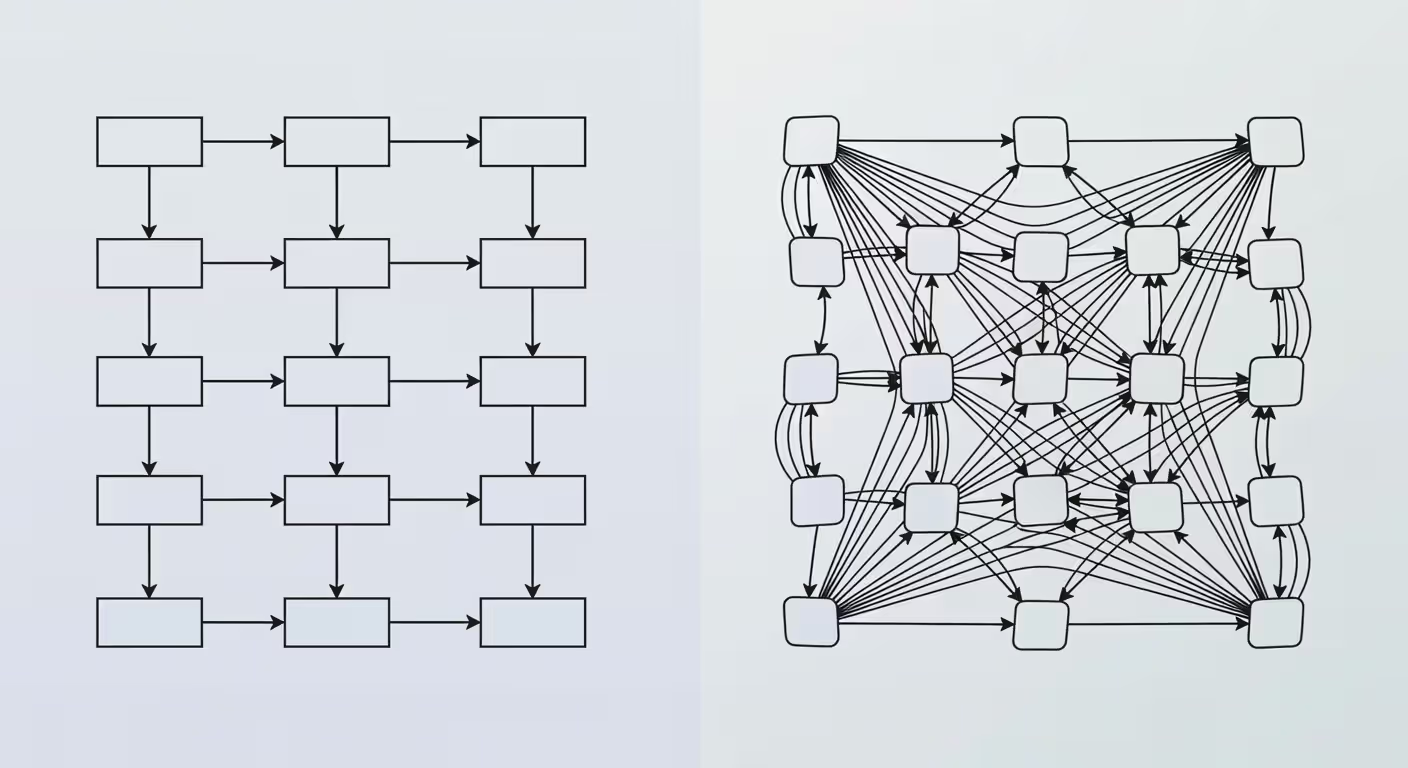
Traditional AI workflow automation typically means using AI models within predetermined workflows. You might use an AI model to classify documents or extract data, but the workflow structure is fixed. If-then logic controls the flow. The AI provides better data processing, but it doesn't make workflow decisions.
Agentic workflows flip this. The AI makes the workflow decisions. It determines what to do next based on context and goals, not predetermined paths.
Here's the practical difference. Traditional approach to processing customer returns: AI extracts data from the return request → rule checks if it's within return window → if yes, route to fulfillment; if no, route to exceptions team → send confirmation email.
Agentic approach: Agent receives return request → assesses situation considering policy, customer history, product condition, and reason → decides best resolution (immediate refund, exchange, store credit, or escalation) → executes chosen path → follows up if needed.
See the difference? Traditional automation has AI as a component. Agentic automation has AI as the decision-maker.
Dimension
Traditional AI Automation
Agentic Workflows
Autonomy Level
Executes predefined steps with AI-enhanced data processing
Makes independent decisions about actions and workflow paths
Decision-Making
Rule-based logic with AI inputs
AI-driven reasoning and judgment calls
Setup Complexity
Lower — map the process, configure rules, integrate AI models
High-volume, predictable processes with clear rules
Complex processes requiring judgment, context, and adaptation
Cost Structure
Predictable per-transaction costs
Variable costs based on reasoning complexity and tool usage
Error Handling
Fails on exceptions, requires explicit error paths
Adapts to exceptions, attempts recovery, escalates when uncertain
When to use traditional AI workflow automation:
You have a well-defined process that doesn't change much. The decision points are clear and can be captured in rules. Volume is high enough that even small efficiency gains matter. You need predictable costs and behavior.
Example: Processing standard loan applications where criteria are explicit and documented.
When to use agentic process automation:
The process requires judgment that's hard to codify in rules. Context matters and varies significantly between cases. Exceptions are common and can't all be anticipated. The value is in handling complexity, not just speed.
Example: Processing complex insurance claims with varying circumstances, multiple coverage types, and judgment calls about liability.
Cost implications are real. Traditional automation is cheaper per transaction once built. Agentic workflows cost more because the LLM runs on every decision. But they handle cases that traditional automation can't touch at all.
You'll often use both. Your workflow might use traditional automation for straightforward cases and route complex ones to agentic workflows. A customer service system could handle password resets with simple automation but deploy an agent for billing questions that require account analysis.
The biggest mistake is trying to force an agentic approach onto simple problems. If you can write clear rules that cover 95% of cases, traditional automation is probably better. Save agentic workflows for where you actually need reasoning and adaptation.
Think of it this way: traditional automation is a specialized tool that does one job extremely well. Agentic workflows are a skilled generalist that can figure out what needs to be done and do it. You need both in your toolkit.
Author: Damien Crowhurst;
Source: aleanetwork.net
FAQ: Agentic Workflows Questions Answered
What makes a workflow "agentic"?
A workflow is agentic when AI agents make autonomous decisions about actions and next steps rather than following predetermined paths. The key is agency — the ability to reason about situations, choose appropriate actions, and adapt to changing conditions. If your workflow can handle unexpected scenarios without human intervention or predefined rules for those scenarios, it's agentic. If it breaks or fails when something unexpected happens, it's traditional automation with AI components.
Do I need coding skills to build agentic workflows?
It depends on complexity. Simple agentic workflows can be built using no-code platforms that now include AI agent capabilities. You'll configure rather than code. For more sophisticated workflows with custom logic, tool integrations, and specific requirements, you'll need some programming ability or developer support. Most businesses find that low-code frameworks offer the best balance — technical team members can build and customize without being expert programmers. The prompt engineering (writing instructions for the AI) is often more important than coding skills.
How much does agentic workflow automation cost?
Costs vary widely based on workflow complexity and volume. You'll pay for LLM API calls (typically $0.01-$0.10 per workflow run depending on reasoning complexity), platform or framework fees if using commercial tools, and infrastructure costs for hosting and data storage. A simple workflow processing 1,000 runs per month might cost $50-$200. Complex workflows with extensive reasoning and tool usage can run several dollars per execution. The economics work when the cost per run is significantly less than the human time saved. Most companies see ROI when agentic workflows replace tasks that take humans 15+ minutes.
What's the difference between an AI agent and a chatbot?
Chatbots are conversational interfaces — they respond to user inputs in natural language. AI agents are autonomous systems that take actions to achieve goals. A chatbot might answer questions about your order status. An AI agent tracks your shipment, identifies a delay, proactively reroutes it, updates the delivery estimate, and notifies you — all without you asking. Chatbots are reactive and conversational. Agents are proactive and action-oriented. Some systems combine both: a chatbot interface powered by agentic workflows that actually do things rather than just talk about them.
Can agentic workflows integrate with existing business tools?
Yes, and this is critical for practical deployment. Agentic workflows integrate with business systems through APIs, database connections, email, file systems, and webhooks. Most modern business software (CRMs, ERPs, communication tools, databases) offers API access. The agent uses these APIs as tools — it can read data, update records, trigger actions, and coordinate across systems. You'll need to set up authentication and access permissions, but the technical integration is usually straightforward. The challenge is more about defining what the agent should be allowed to do in each system rather than the technical connection itself.
Are agentic workflows secure for sensitive data?
Security depends entirely on implementation. Agentic workflows can be secure if you follow proper practices: encrypt data in transit and at rest, implement role-based access controls, audit all agent actions, keep sensitive data out of LLM training (use APIs that don't train on your data), implement approval requirements for sensitive operations, and maintain comprehensive logs. The risk isn't inherently higher than other automation — it's different. Your agent has broad capabilities, so you need strong guardrails. Many companies start by deploying agentic workflows on non-sensitive processes while they build confidence in security controls. For regulated industries, you'll want agents that run on-premise or in private cloud environments rather than public LLM APIs.
Agentic workflows represent a fundamental shift in how we think about automation. They're not just faster versions of what came before — they're capable of handling complexity that previously required human judgment. As LLM capabilities improve and tooling matures, expect to see agentic automation move from experimental to standard practice across industries. The businesses figuring this out now are building significant operational advantages that will be hard for competitors to match later.
AI visibility tools monitor how often your brand appears in AI-generated responses across ChatGPT, Perplexity, and Gemini. Unlike traditional SEO tools that track Google rankings, these platforms measure citations, mentions, and context in AI answers—helping you optimize for generative engine visibility.
An AI SDR automates prospecting, outreach, and lead qualification using machine learning and natural language processing. Discover how these systems work, when to use AI versus human SDRs, common implementation mistakes, and what tools are available.
Discover how conversational AI assistants use NLP and machine learning to understand context and hold natural dialogues. This guide covers technology fundamentals, use cases, implementation strategies, and how to avoid common challenges when deploying AI assistants for business.
AI voice agents combine speech recognition, natural language processing, and voice synthesis to conduct natural phone conversations. Learn how the technology works, what capabilities modern systems offer, and which industries benefit most from automated voice interactions.
The content on this website is provided for general informational and educational purposes only. It is intended to explain concepts related to AI tools, agents, developer infrastructure, coding assistants, APIs, and productivity workflows.
All information on this website, including articles, guides, and examples, is presented for general educational purposes. Outcomes and tool performance may vary depending on implementation, skill level, and use case.
This website does not provide professional AI consulting, development services, or guarantees of results, and the information presented should not be used as a substitute for consultation with qualified AI or software development professionals.
The website and its authors are not responsible for any errors or omissions, or for any outcomes resulting from decisions made based on the information provided on this website.