You've probably heard developers mention containers or Docker in conversations about deployment. But what exactly are we talking about here? Think of it this way: remember the last time you got software working perfectly on your laptop, only to watch it crash spectacularly on the production server? Containers solve that nightmare. They bundle your application with everything it needs to run—every library, every configuration file, every dependency—into a single package that works the same way everywhere. Your laptop, the testing server, AWS, Google Cloud—doesn't matter. Same package, same behavior.
The concept isn't brand new. Linux had the building blocks for this since around 2006 with cgroups and namespaces. But Docker changed everything when it launched in 2013 by making containers accessible to regular developers, not just kernel hackers. Now? You'll find containers running everything from two-person startups to Netflix's streaming infrastructure.
How Containerization Works
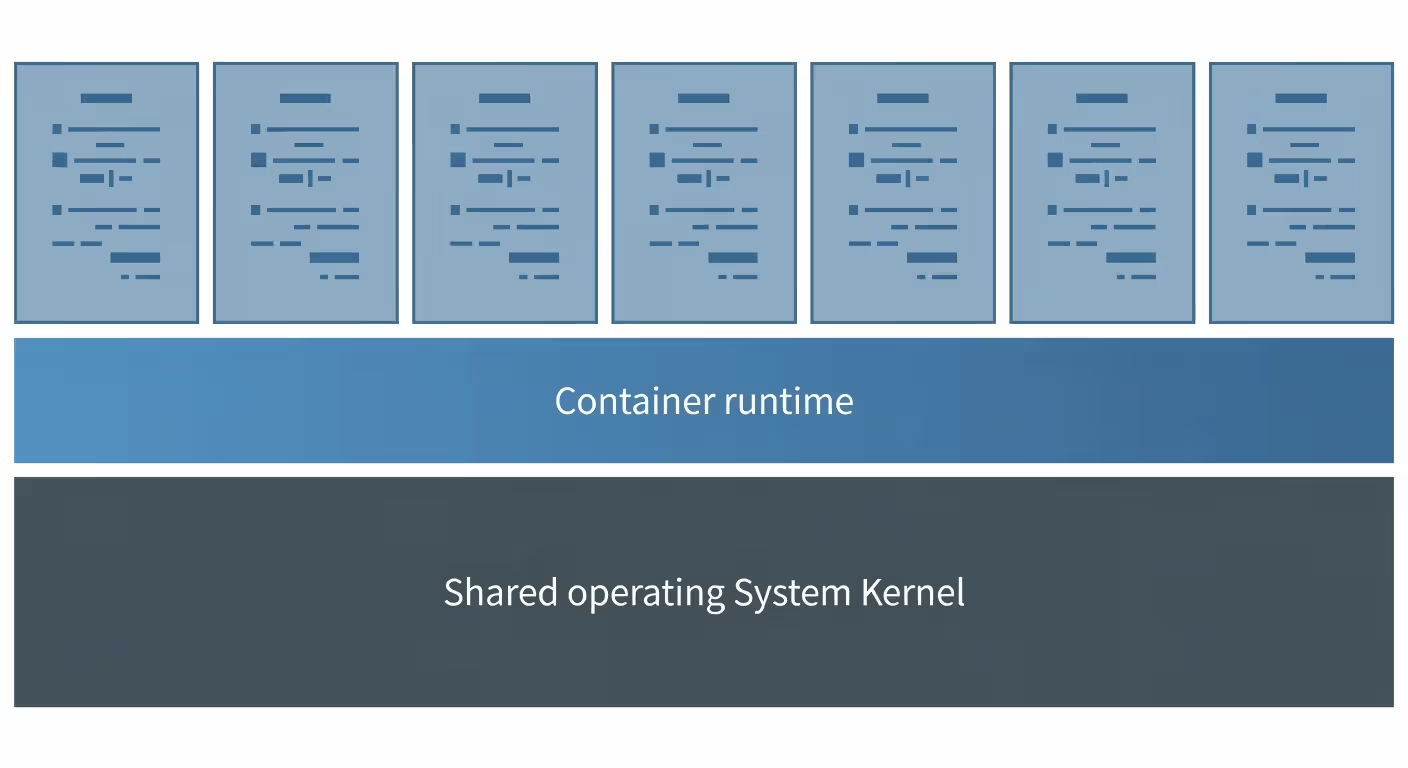
Here's what happens under the hood. Your application gets packaged with its dependencies—think runtime libraries, config files, maybe some binaries—into what we call a container. The clever bit? Unlike virtual machines that drag along an entire operating system, containers share the host's OS kernel. That's why they're so lightweight.
Linux makes this possible through some kernel features that sound intimidating but work elegantly. Namespaces create separate views of system resources—each container thinks it's alone on the machine with its own process tree, network stack, and filesystem. Meanwhile, cgroups (control groups) act like resource police, limiting how much CPU, memory, and disk I/O each container can consume. One rogue container can't starve everything else.
Think of container images as recipes. They're read-only templates that describe exactly what your container needs. When you launch an image, you get a running container—a live instance of that template. One image might spawn five containers, or fifty, or five hundred. Each runs independently.
Author: Adrian Westmere;
Source: aleanetwork.net
The container runtime handles the dirty work. It talks to the kernel, sets up those namespaces, enforces the resource limits, and manages the container lifecycle. Docker Engine is what most people use, though containerd and CRI-O power plenty of production systems behind the scenes.
Isolation happens at several levels. Process isolation means containers can't see each other's running processes. Network isolation gives each container its own IP address and port space. Filesystem isolation prevents containers from accessing each other's files. It's not perfect isolation—they're still sharing a kernel, after all—but it's sufficient for most real-world scenarios.
Resource usage works differently than you might expect. VMs require you to allocate fixed amounts of RAM and CPU upfront. Containers? They use what they need, when they need it, pulled from the host's available pool. You can set upper limits to prevent problems, but there's no wasteful pre-allocation.
Docker and Popular Containerization Platforms
Docker didn't invent containers. What Docker did was take something that required deep Linux knowledge and manual kernel configuration, then wrap it in commands anyone could understand. That's why it won.
The Docker ecosystem has several moving parts. Docker Engine is the runtime that actually executes containers. Docker Hub works like GitHub for container images—millions of pre-built images ready to download and run. Docker Compose lets you define multi-container applications in YAML files. Docker Desktop brings the whole thing to Mac and Windows developers.
Why does everyone use Docker? Documentation. Community size. The fact that you can go from zero to running your first container in about ten minutes. That matters more than technical superiority.
But alternatives exist with their own advantages. Podman removes the need for a background daemon process running with root privileges—a security improvement some teams care deeply about. The commands look nearly identical to Docker, so switching is painless.
containerd operates one layer below what most developers see. Docker actually uses containerd internally for the heavy lifting. Kubernetes dropped direct Docker support in favor of containerd. It's less friendly for interactive use but rock-solid for infrastructure.
LXC (Linux Containers) predates all of this and takes a different approach—system containers that act more like lightweight VMs than application containers. Some workloads still benefit from this model.
The Open Container Initiative (OCI) standardized image formats and runtime specifications. That means an image you build with Docker will run in Podman or any other OCI-compliant tool. No vendor lock-in.
For someone just starting out? Docker remains the practical choice. Every tutorial assumes Docker. Every StackOverflow answer references Docker. Every CI/CD platform has Docker integration baked in.
Containerization vs Virtualization
VMs and containers both isolate applications, but they work completely differently under the hood. Understanding the distinction helps you pick the right tool.
Virtual machines virtualize hardware. Each VM runs a full operating system—kernel, system libraries, everything. A hypervisor like VMware or KVM sits between the physical hardware and your VMs, dividing up resources. Running three VMs means running three complete operating systems.
Containers virtualize the OS layer instead. They share the host kernel but get isolated user spaces. Three containers on one host share a single kernel serving three separate environments.
Feature
Containers
Virtual Machines
Architecture
Shared kernel, isolated user spaces
Full OS per instance with hypervisor
Resource overhead
Usually megabytes, minimal CPU penalty
Several gigabytes, dedicated CPU allocation
Startup time
Often under one second
Typically 30 seconds to several minutes
Isolation level
Process-level (good enough for most cases)
Hardware-level (maximum security)
Portability
Runs anywhere with compatible kernel
Needs matching hypervisor
Best use cases
Microservices, cloud apps, CI/CD
Legacy apps, mixed OS needs, strict isolation
Startup speed tells the story clearly. VMs must boot an entire operating system—BIOS, kernel, system services, the works. That takes 30 seconds minimum, often several minutes. Containers just launch your application process directly. Sub-second startup is normal.
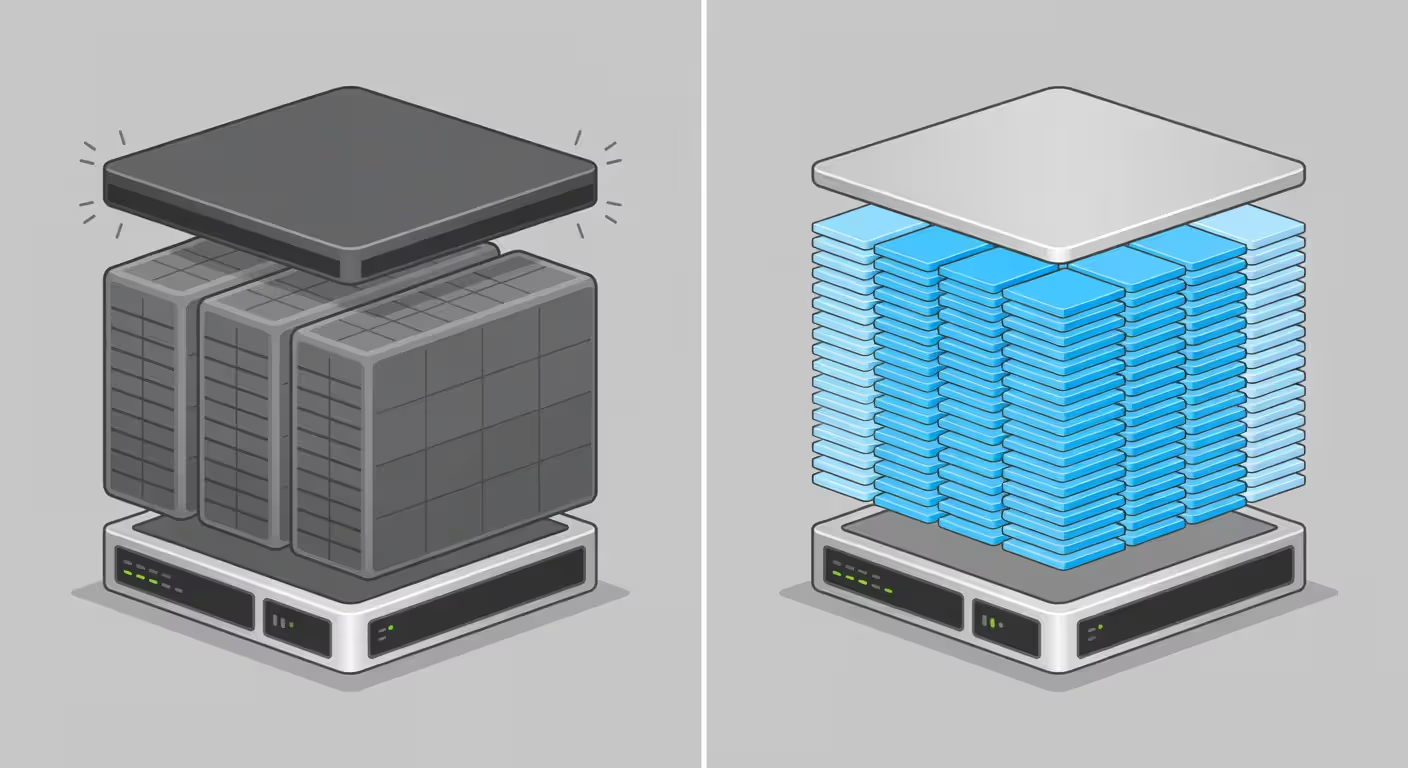
Resource consumption differs dramatically. A typical VM reserves 2-4 GB of RAM just for the guest OS before your application uses any memory. Containers share the kernel's memory footprint collectively. Hardware that comfortably runs 2-3 VMs might handle 10-20 containers easily.
Author: Adrian Westmere;
Source: aleanetwork.net
VMs provide stronger isolation. Separate kernels mean a kernel exploit in one VM doesn't automatically compromise others. Containers share a kernel, so kernel vulnerabilities potentially affect all containers on that host. If you're running untrusted code or need maximum security, VMs offer better boundaries.
Many organizations use both technologies together. Containers often run inside VMs, combining VM isolation with container efficiency. Cloud providers frequently use this pattern—your Kubernetes cluster runs on VM instances that contain your containerized workloads.
Mixed operating systems require VMs. Windows containers won't run on a Linux kernel. Linux containers won't run on Windows (without WSL2 or similar). If your application stack spans both Windows and Linux, you need VMs or separate hosts.
Benefits of Application Containerization
Portability is the killer feature. Build your image once, and it runs identically on your laptop, your colleague's laptop, the staging server, and production. Differences in installed libraries or system configurations become irrelevant.
This eliminates the "works on my machine" problem that's plagued developers forever. When code works locally but breaks in production, containerization removes most of the usual suspects. Production runs the exact same image with identical dependencies and matching configurations.
That consistency cuts troubleshooting time dramatically. Production bugs become reproducible on your laptop by running the same container image. You're not trying to recreate the production environment—you're literally running it.
Resource efficiency translates to real money. A physical server that comfortably hosts 10 VMs might run 50-100 containers depending on your workload. In cloud environments where you pay for what you use, that density improvement directly reduces your bill.
Deployment speed changes how fast you can ship features. Traditional deployments involve configuration management, package installation, service restarts—lots of moving parts. Container deployments are atomic: stop the old container, start the new one. Rollbacks work the same way: restart the previous image.
Scaling becomes trivial with containers. Traffic spike? Spin up more container instances of the affected service. Traffic drops? Kill the extras. This happens in seconds and automates easily.
Microservices architecture basically requires containers. When you're managing dozens of separate services instead of one monolithic app, you need lightweight deployment units. Containers let each service run with isolated dependencies, independent update cycles, and service-specific scaling.
Version management gets simpler. Container images have explicit version tags. You can run multiple versions simultaneously for A/B testing or gradual rollouts. Old versions stick around in registries, making rollbacks instant.
New developer onboarding accelerates dramatically. Clone the repo, run docker compose up, and you've got a fully functional environment including databases, caches, and properly configured services. No more ten-page setup documents or platform-specific gotchas.
One warning: don't treat containers as opaque black boxes. You should feel comfortable exec-ing into running containers, checking logs, and understanding what's happening inside. Opacity creates operational problems down the line.
Containerization in DevOps Workflows
DevOps teams adopted containers faster than almost any technology I've seen. The fit is natural—DevOps emphasizes automation, consistency, and fast iteration. Containers deliver all three.
Modern CI/CD pipelines treat containers as first-class citizens. A typical pipeline builds container images from source code, runs tests inside containers, pushes images to registries, and deploys them to production. The same artifact moves through every stage.
Containers cut our deployment time from 45 minutes to under 3 minutes. More importantly, they eliminated the configuration drift that caused 60% of our production incidents. When every environment runs identical containers, a whole category of problems just disappears.
— Chen Sarah
Environment parity becomes actually achievable. Development, testing, staging, and production all run the same container images. The only differences are runtime values—database connection strings, API keys, feature flags.
Testing improves significantly. Spin up containers for your app and test database, run your tests, then destroy everything. Complete test environments become disposable and perfectly reproducible. Tests that used to share databases and interfere with each other now run in total isolation.
Orchestration platforms like Kubernetes take DevOps automation further. Kubernetes handles container scheduling, scaling, networking, and health checks. You declare what you want—"keep 5 instances of this service running"—and Kubernetes makes it happen.
Deployment strategies get more sophisticated. Blue-green deployments become straightforward: run new versions alongside old ones, switch traffic to the new version, keep the old version around briefly for potential rollback. Canary releases send a small percentage of traffic to new versions while monitoring error rates.
GitOps workflows treat infrastructure as version-controlled code. Container definitions, Kubernetes manifests, and configurations live in Git. Changes go through pull request reviews. Deployments happen automatically when changes merge to main.
Monitoring and logging integrate cleanly. Containers write logs to stdout/stderr, which platforms aggregate centrally. Health check endpoints tell orchestrators whether containers are working properly. Metrics exporters run as sidecar containers next to your app.
Secret management needs careful attention. Never bake secrets into container images—they'll persist in registries and version history forever. Inject secrets at runtime using Kubernetes Secrets, HashiCorp Vault, or cloud-native secret managers.
The learning curve is real. Teams moving from traditional deployment to containers and orchestration face substantial knowledge gaps. But the investment pays off in measurable reliability and velocity improvements.
Getting Started with Container-Based Deployment
You don't need to transform your entire infrastructure to start with containers. Begin small, learn the basics, expand gradually.
Requirements are minimal. Install Docker Desktop (Mac or Windows) or Docker Engine (Linux). Installation takes minutes following the official docs. You don't need Kubernetes or orchestration yet.
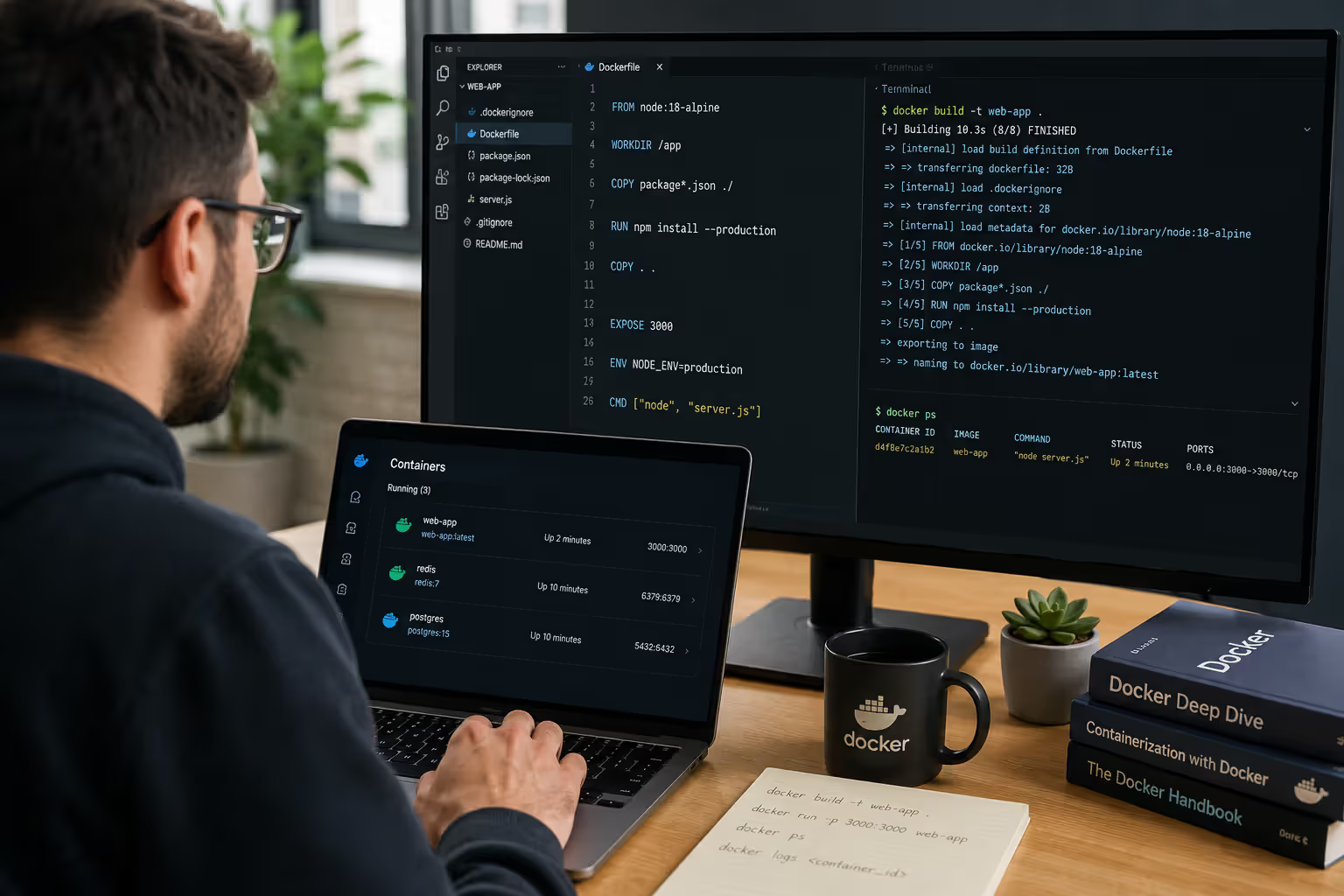
Your first container should demonstrate core concepts—maybe a simple web server or basic app. Docker Hub has thousands of ready-to-run images available immediately. Try docker run -p 8080:80 nginx to launch a web server accessible at localhost:8080.
Author: Adrian Westmere;
Source: aleanetwork.net
Understanding images versus containers matters right away. Images are templates. Containers are running instances. One image can create unlimited containers. Stopping a container doesn't delete the image. Deleting an image doesn't affect running containers (though you can't start new ones).
Common beginner mistakes cause avoidable headaches. Running everything as root inside containers creates security risks—configure non-root users in your images. Storing data inside containers loses data when containers stop—use volumes for persistence. Building huge images slows everything down—use multi-stage builds and minimal base images.
Writing Your First Dockerfile
Dockerfiles are build instructions for container images. These text files contain commands that Docker executes step by step.
Start by picking a base image. Python apps might use FROM python:3.11-slim. Node.js projects could use FROM node:20-alpine. Alpine-based images are remarkably small—often under 50 MB—speeding up builds and deployments.
Copy your application code into the image. Set working directories, copy files, install packages. Each instruction creates a layer in your image. Docker caches these layers, avoiding unnecessary rebuilds when nothing changed.
Here's a useful pattern: install dependencies before copying application code. Dependencies change less frequently than your source code, maximizing cache hits and speeding up builds.
What launches when the container starts? That's defined by your final instruction—usually launching your web server or starting your background worker.
Multi-stage builds can shrink final images dramatically. Compile your app in a build stage with full toolchains, then copy only the compiled artifacts to a minimal runtime image. Node.js apps might build in 1 GB images but run in 150 MB images.
Layer optimization matters more than you'd think. Instructions like RUN, COPY, and ADD each create layers. Combine related operations into single RUN statements to reduce layer count. Delete temporary files in the same layer where you create them—removing files in later layers doesn't reduce image size.
Container Orchestration Basics
Manual container management works fine for learning and small projects. Production workloads need orchestration—automated scheduling, scaling, networking, and failure recovery.
Kubernetes became the standard orchestration platform. It's complex, no question. But it solves real problems: deploying 50 microservices across 100 servers, scaling services based on load, handling server failures without downtime.
You don't need Kubernetes immediately. Docker Compose manages multi-container apps on single hosts. Define your services in a YAML file—web server, database, cache—and docker compose up launches everything with proper networking.
When you outgrow a single host, orchestration becomes necessary. Kubernetes, Docker Swarm, or managed services like AWS ECS take over. They distribute containers across server fleets, route traffic, restart failed containers, and automate scaling.
Simpler is often better. AWS workloads with straightforward requirements might find ECS easier than Kubernetes. Teams needing maximum flexibility and willing to accept complexity find Kubernetes is the industry standard.
Service meshes like Istio or Linkerd add advanced capabilities—traffic management, security policies, inter-service observability. These are advanced topics. Master fundamentals first.
Common Containerization Challenges and Solutions
Security concerns dominate containerization discussions. Shared host kernels mean kernel vulnerabilities potentially impact all containers. Container images often contain outdated packages with known security flaws. Running as root inside containers amplifies breach damage.
Solutions exist for each concern. Scan images for vulnerabilities using tools like Trivy or Snyk. Keep base images current—security patches matter. Run as non-root users. Use read-only filesystems where possible. Enforce security policies using Pod Security Standards in Kubernetes.
Persistent storage confuses teams used to traditional servers. Containers are ephemeral by design—data inside vanishes when containers stop. Applications needing persistent data must use volumes or external storage.
Volumes connect host directories or network storage into containers. Docker volumes exist independently of container lifecycles, managed by Docker itself. Bind mounts map specific host paths into containers—useful during development. Kubernetes persistent volume claims abstract storage details.
Networking complexity grows with scale. Containers need to communicate with each other, external services, and the internet. Container platforms create virtual networks, assign IP addresses, manage DNS resolution. Debugging network issues requires understanding these abstractions.
Start simple. Use container names for service discovery instead of IP addresses—Docker and Kubernetes handle DNS automatically. Expose only necessary ports. Use network policies to restrict container-to-container traffic in production.
Monitoring and logging work differently than traditional servers. Containers start and stop frequently, eliminating persistent log files. Applications should write logs to stdout/stderr, letting container platforms aggregate them centrally. Metrics need scraping or pushing to monitoring systems before containers disappear.
Prometheus for metrics and Elasticsearch or Loki for logs integrate well with container platforms. Many teams prefer managed services—CloudWatch, Datadog, New Relic—avoiding self-hosted monitoring infrastructure.
Learning curves challenge teams new to containers. Developers must understand images, volumes, networking, and orchestration basics. Operations teams learn new deployment patterns and debugging approaches. Budget real time for training and experimentation.
Stateful applications present particular challenges. Databases, message queues, and similar stateful services don't fit naturally with disposable containers. While you can run them in containers with careful volume management, many teams prefer managed services—RDS for databases, SQS for queues—containerizing only stateless application layers.
Image bloat slows deployments and wastes resources. 2 GB images take longer to transfer than 200 MB images. Use slim base images, multi-stage builds, and .dockerignore files to exclude unnecessary content. Regularly audit images and remove unused components.
FAQ: Containerization Questions Answered
Is containerization the same as Docker?
No, containerization is the technology and approach while Docker is one specific tool. Containerization means packaging applications with their dependencies into isolated units. Docker is a platform that made this accessible to regular developers. Other tools like Podman, containerd, and LXC also provide containerization. Docker popularized containers and leads the market, but they're not synonymous.
Can containers run on Windows servers?
Yes, Windows containers run natively on Windows Server 2016 and later. Windows offers two types: Windows Server containers (sharing the host kernel like Linux containers) and Hyper-V containers (adding isolation through lightweight virtualization). Linux containers can't run directly on Windows servers without a Linux VM layer, though Docker Desktop for Windows uses WSL2 to enable Linux container support. Most production container workloads still prefer Linux due to ecosystem maturity and better tooling.
How many containers can run on one host?
It depends on your workload and hardware. A server with 64 GB RAM and 16 cores might support 10 heavy containers or over 200 lightweight ones. Containers share the host kernel and resources, so limits are practical rather than architectural. Memory usually becomes the bottleneck first—watch container memory usage and set limits to prevent any single container from hogging resources. Production deployments commonly run 20-50 containers per host, leaving headroom for spikes and failures.
Do I need Kubernetes to use containers?
Not at all. Kubernetes orchestrates containers across multiple servers at large scale. Single-host deployments or small clusters work great with Docker Compose or basic Docker commands. Plenty of successful applications run containerized without Kubernetes. Orchestration becomes valuable when you're managing dozens of services across many servers, need automated scaling, or want sophisticated deployment strategies. Start simple and add orchestration when simpler tools become limiting.
Are containers secure for production workloads?
Containers can be production-secure with proper configuration, but they require attention to security practices. Scan images for vulnerabilities, run containers as non-root users, apply resource limits, and keep base images current. Use security mechanisms like AppArmor or SELinux for additional isolation. Containers provide process-level isolation that's adequate for most applications but weaker than VM-level separation. Multi-tenant environments or highly sensitive workloads might warrant running containers inside VMs or using enhanced security layers like gVisor.
What's the difference between a container image and a container?
Container images are read-only templates containing your application code, dependencies, and configuration—basically snapshots or blueprints. Containers are live instances created from those images. You build an image once and create many containers from it. Images sit in registries while containers run on hosts. Stopping containers leaves images unchanged. You can update images and launch new containers from updated versions while existing containers keep running older versions.
Containerization evolved from emerging tech to standard practice over the past decade. Teams using containers achieve faster deployments, consistent environments, and better resource utilization. The learning investment is substantial, but returns show up in improved reliability and developer productivity. Start with Docker, containerize one application, and expand as you gain confidence. The ecosystem has matured, community support is strong, and benefits appear quickly.
Performance monitoring tools track application response times, server health, and infrastructure metrics to catch problems before users notice. This guide covers how monitoring works, types of tools available, key features to evaluate, and common implementation mistakes to avoid.
An API platform is the complete ecosystem that handles routing, security, lifecycle management, and governance for your APIs. Understand the core components—gateway, manager, portal, analytics—and learn how to evaluate platforms based on scalability, developer experience, and integration capabilities.
Comprehensive guide to test automation for QA teams. Covers automation frameworks, popular testing tools comparison, best practices for maintainable test suites, continuous testing in CI/CD pipelines, and common mistakes to avoid when implementing automated testing strategies.
Comprehensive guide to software testing covering testing lifecycle, manual vs automated approaches, functional and non-functional testing types, AI-powered testing tools, and common mistakes to avoid. Learn practical strategies for building quality into your development process.
The content on this website is provided for general informational and educational purposes only. It is intended to explain concepts related to AI tools, agents, developer infrastructure, coding assistants, APIs, and productivity workflows.
All information on this website, including articles, guides, and examples, is presented for general educational purposes. Outcomes and tool performance may vary depending on implementation, skill level, and use case.
This website does not provide professional AI consulting, development services, or guarantees of results, and the information presented should not be used as a substitute for consultation with qualified AI or software development professionals.
The website and its authors are not responsible for any errors or omissions, or for any outcomes resulting from decisions made based on the information provided on this website.