Modern software doesn't exist in isolation. Applications talk to each other constantly—sharing data, triggering actions, coordinating workflows. The infrastructure that makes this possible? That's where an API platform comes in. It's not just a single tool. Think of it as a complete ecosystem that handles everything from routing requests to enforcing security policies to tracking who's calling what and when. If you're evaluating solutions or trying to understand how these systems fit together, you're in the right place. We'll break down what an API platform actually does, how its pieces work together, and what separates a solid choice from a regrettable one.
Core Components of an API Platform
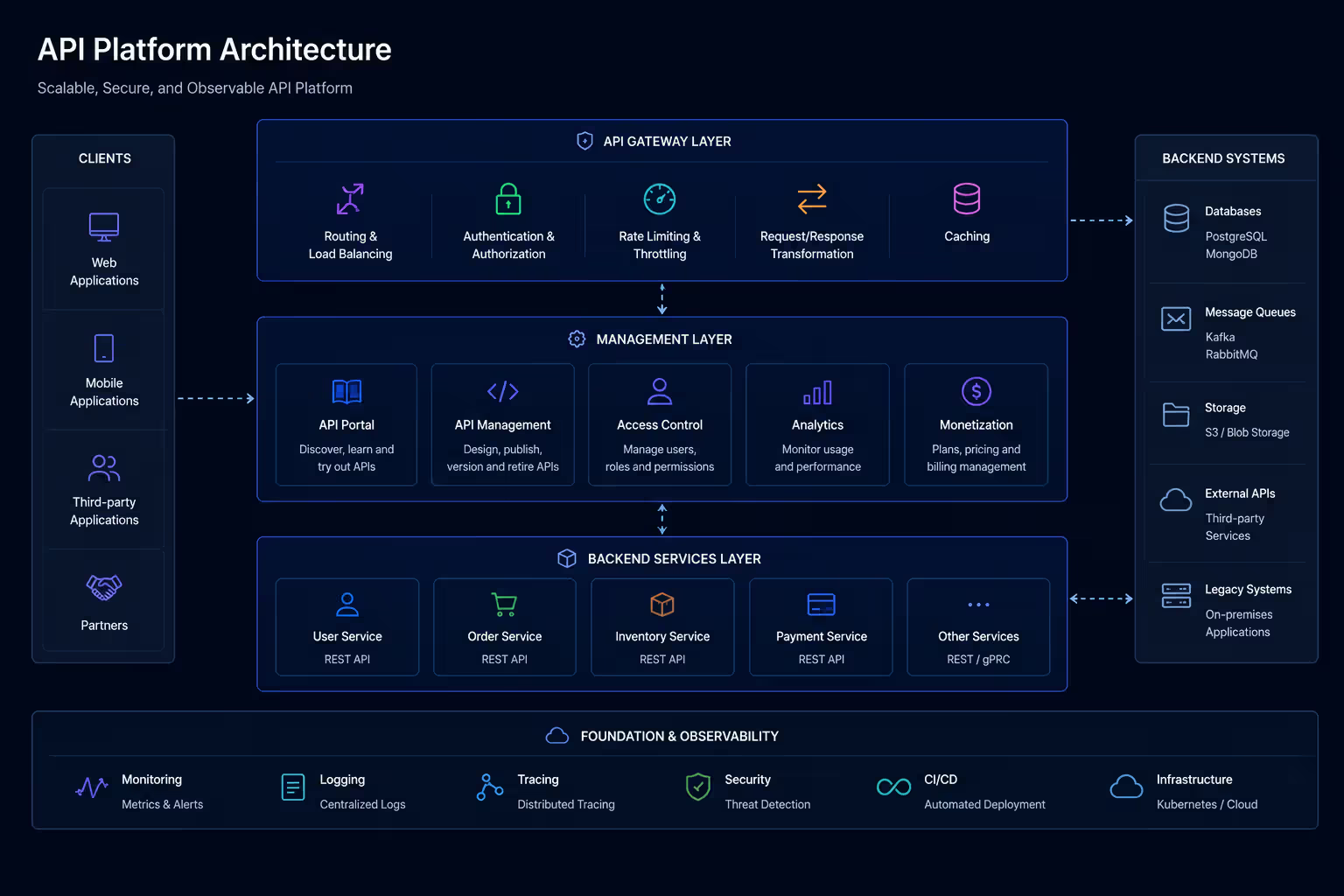
An API platform isn't a monolith. It's built from several distinct layers, each handling a specific job. Understanding these building blocks helps you evaluate what you actually need.
API Gateway. This is the front door. Every request from an external client hits the gateway first. It routes traffic, enforces rate limits, and handles authentication before anything reaches your backend services. Without a gateway, every service would need its own security and throttling logic. That gets messy fast.
API Manager. This is your control center. It's where you define policies, configure endpoints, set up access controls, and manage API versions. The manager tools give your team a single place to govern everything—no hunting through config files scattered across repos.
Developer Portal. Good platforms include a self-service portal where external developers can discover APIs, read documentation, generate keys, and test endpoints. It's the difference between fielding a hundred support tickets and letting developers solve their own onboarding.
Analytics and Monitoring. You need visibility. Who's calling your APIs? Which endpoints are slow? Where are errors spiking? The analytics layer collects telemetry, aggregates metrics, and surfaces insights. Without this, you're flying blind.
Security Layer. This cuts across everything. OAuth2, API keys, JWT validation, IP whitelisting, payload encryption—the platform enforces these policies consistently. One pattern I see most often: teams underestimate how much manual work this replaces. Centralizing security logic saves weeks of engineering time.
These components work together. The gateway handles runtime traffic. The manager configures policies. The portal serves developers. Analytics feed back into management decisions. And security wraps the whole stack.
Author: Adrian Westmere;
Source: aleanetwork.net
API Gateway vs API Management Platform
People conflate these terms constantly. They're related but not the same.
An API gateway is a single component—a reverse proxy with superpowers. It sits at the network edge, intercepts requests, applies policies (rate limiting, authentication, transformation), and forwards traffic to backend services. Think of it as a smart router. It operates at runtime. It's fast, stateless, and focused on request handling.
An API management platform is the full stack. It includes the gateway, yes, but also the management UI, the developer portal, analytics, lifecycle tools, and governance features. The platform is where you design APIs, publish documentation, manage subscriptions, track usage, and retire old versions. The gateway is one piece of that puzzle.
Here's the distinction in practice: if you deploy Kong or Tyk as a standalone gateway, you get request routing and plugin-based policies. But you don't get a visual management console, a portal for third-party developers, or built-in analytics dashboards. For that, you need the full platform—or you build those layers yourself.
Many teams start with just a gateway. They outgrow it when they need centralized governance or external developer onboarding. Jumping straight to a full platform makes sense if you're exposing APIs to partners or customers. If it's purely internal microservices? A lightweight gateway might suffice.
The simpler option usually wins here. Don't over-architect early.
APIs are the connective tissue of modern software architecture—they define not just how systems communicate, but how reliably and securely they can scale together.
— Fielding Roy
How API Lifecycle Management Works
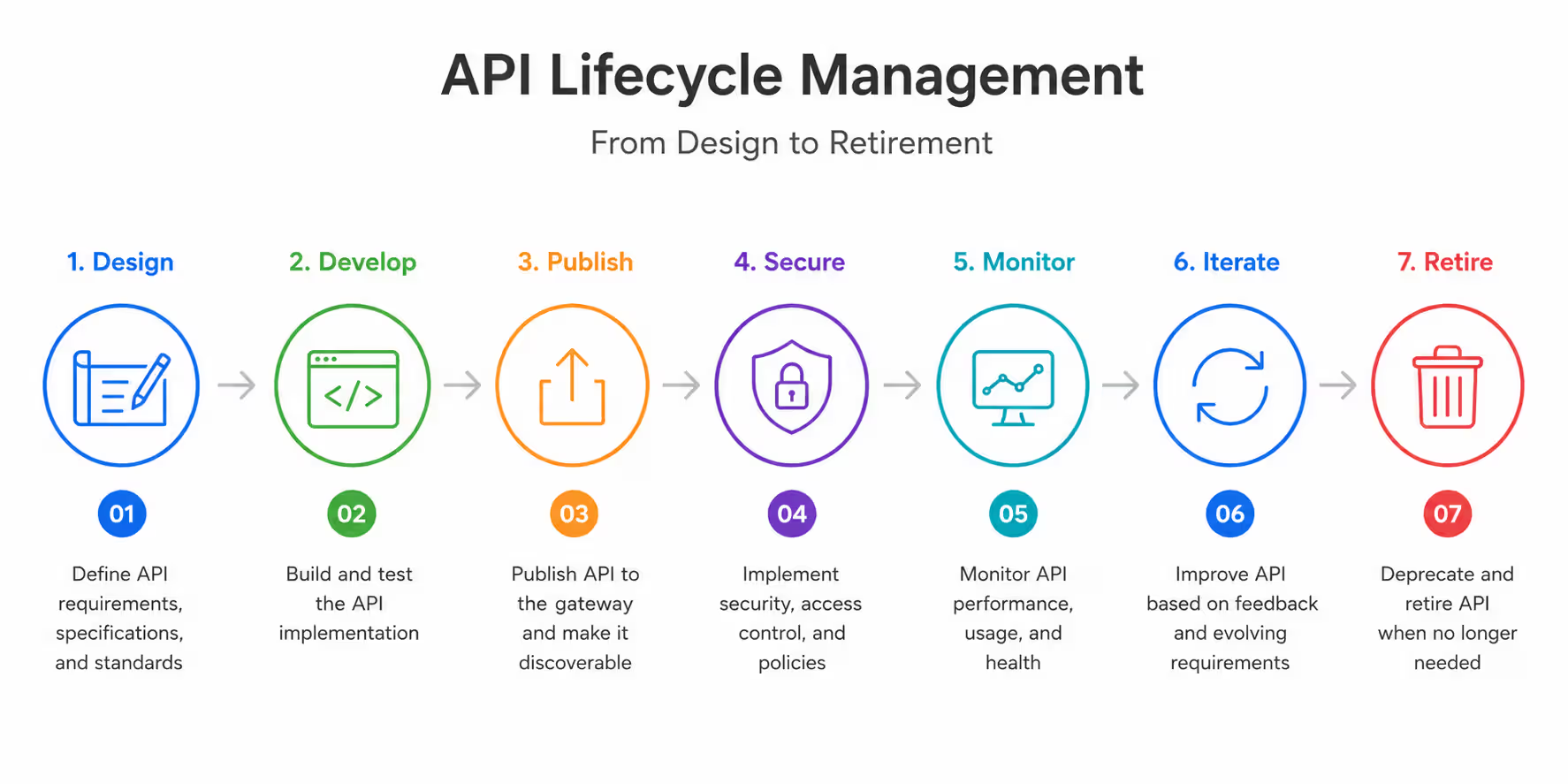
APIs aren't static. They evolve. New versions ship. Old ones get deprecated. Lifecycle management is the process that takes an API from concept to retirement—and keeps it healthy in between.
Design. This is where you define the contract: endpoints, methods, request/response schemas, authentication requirements. Tools like OpenAPI (formerly Swagger) let you spec this out before writing code. Good platforms let you design in the UI, generate docs automatically, and share specs with frontend teams early.
Deployment. Once the API is built, you publish it through the platform. This usually means registering the service, configuring the gateway to route traffic, and applying policies (rate limits, security rules, caching). Some platforms support blue-green or canary deployments, letting you test new versions with a small percentage of traffic before rolling out fully.
Versioning. APIs change. You add fields, deprecate endpoints, fix bugs. Versioning lets you run multiple iterations simultaneously—v1 for legacy clients, v2 for new integrations. The platform routes requests based on version identifiers (URL path, header, or query param). This prevents breaking existing consumers when you ship updates.
Monitoring. Once live, you track performance: latency, error rates, throughput. You also watch for anomalies—sudden spikes in 4xx errors, unusual traffic patterns, slow database queries. Monitoring feeds into incident response and capacity planning.
Retirement. Eventually, old versions need to die. Lifecycle management includes deprecation workflows: marking endpoints as deprecated, notifying consumers, setting sunset dates, and finally shutting down the version. Without a clear process, you end up supporting ancient APIs indefinitely. That's technical debt you don't want.
The platform automates much of this. You're not manually updating gateway configs or emailing developers about deprecations. The system handles notifications, enforces sunset policies, and tracks which clients still call old versions.
Author: Adrian Westmere;
Source: aleanetwork.net
Key Features to Look for in Enterprise API Platforms
Not all platforms are built for the same scale or complexity. If you're choosing a solution for an enterprise, these features matter.
Security and Compliance. You need OAuth2, OpenID Connect, mutual TLS, and fine-grained access control. Look for support for SAML, LDAP, and identity federation if you're integrating with enterprise IAM. Compliance certifications (SOC 2, ISO 27001, GDPR readiness) matter if you're in regulated industries. Don't assume security is a checkbox—test how policies are enforced and audited.
Scalability. Can the platform handle 10,000 requests per second? A million? Horizontal scaling should be straightforward—add more gateway nodes without reconfiguring everything. Check if the control plane (management layer) scales independently from the data plane (gateway). Bottlenecks in the control plane can lock you out of making changes during traffic spikes.
Developer Portal. This is your external face. It should support interactive API docs (try-it-out consoles), automatic SDK generation, and self-service key provisioning. Customization matters—can you brand it, add custom content, integrate SSO? A clunky portal frustrates partners and increases support load.
Analytics and Observability. Real-time dashboards are table stakes. You also want historical reporting, anomaly detection, and the ability to drill down into individual requests. Integration with observability tools (Datadog, New Relic, Prometheus) is a plus. The pattern I see most often: teams pick a platform with weak analytics, then spend months building custom dashboards.
Multi-Cloud and Hybrid Support. Can you deploy the platform on AWS, Azure, GCP, and on-prem? Does it support hybrid topologies—gateway nodes in multiple regions, centralized management? Vendor lock-in is real. Choose platforms that don't force you into a single cloud.
DevOps Integration. CI/CD pipelines should be able to deploy APIs programmatically. Look for Terraform providers, Kubernetes operators, and REST APIs for management tasks. If your team uses GitOps, the platform should support declarative config (YAML or JSON) that lives in version control.
Extensibility. Can you write custom plugins or middleware? Some platforms (Kong, Apigee) let you extend functionality with Lua, JavaScript, or Java. This matters when you have unique requirements—custom authentication schemes, proprietary logging formats, specialized rate limiting.
Don't chase feature lists blindly. Map your actual requirements first. A small team with internal APIs has different needs than a SaaS company exposing APIs to thousands of partners.
Comparing Popular API Platforms
Here's a high-level look at leading solutions. This isn't exhaustive, but it covers the platforms you'll encounter most often in 2026.
Platform
Deployment Options
Pricing Model
Key Strengths
Best Use Case
Kong
Self-hosted, cloud, hybrid
Open-source + Enterprise
High performance, plugin ecosystem, Kubernetes-native
Microservices, high-throughput APIs
Apigee (Google)
Google Cloud, hybrid
Usage-based
Enterprise features, analytics, developer portal
Large enterprises, complex API programs
AWS API Gateway
AWS-managed
Pay-per-request
Deep AWS integration, serverless-friendly
AWS-native architectures, Lambda backends
MuleSoft
Cloud, on-prem, hybrid
Subscription
Integration platform, connectors, API-led design
Enterprises with heavy integration needs
Azure APIM
Azure-managed, hybrid
Tiered pricing
Azure ecosystem integration, policy flexibility
Microsoft-centric stacks, hybrid cloud
Kong is popular with engineering-driven teams. It's open-source at the core, which means no vendor lock-in for the gateway itself. The Enterprise tier adds management UI, RBAC, and support. It's fast and scales horizontally. The plugin architecture is powerful but requires some Lua knowledge for custom extensions.
Apigee is the heavyweight. It's built for enterprises managing hundreds of APIs across multiple teams. The developer portal is polished. Analytics are deep. But it's complex—expect a learning curve and higher costs. Google's acquisition means tight GCP integration, though hybrid deployments are supported.
AWS API Gateway makes sense if you're all-in on AWS. It integrates seamlessly with Lambda, Cognito, and CloudWatch. Pricing is straightforward: you pay per million requests. The downside? It's AWS-only. If you need multi-cloud, look elsewhere.
MuleSoft is more than an API platform—it's a full integration suite. If you're connecting legacy systems, SaaS apps, and modern APIs, MuleSoft's connector library is unmatched. But it's heavy and expensive. Overkill for simple API management.
Azure API Management fits naturally into Microsoft shops. It integrates with Azure Active Directory, Logic Apps, and Azure Monitor. The policy language is XML-based, which some love and others hate. Pricing tiers range from developer-friendly to enterprise-scale.
The right choice depends on your stack, team skills, and scale. Don't pick based on brand recognition alone.
Author: Adrian Westmere;
Source: aleanetwork.net
Common Mistakes When Choosing an API Platform
I've seen teams make the same errors repeatedly. Here's what to avoid.
Ignoring Scalability Early. You start small. Traffic is light. You pick a platform that works fine at 100 requests per second. Then you hit product-market fit. Traffic spikes to 10,000 RPS. The platform chokes. Migrating under load is painful. Plan for 10x growth, even if it feels premature.
Underestimating Operational Complexity. Some platforms require deep expertise to operate. If you pick a self-hosted solution, you own uptime, patching, scaling, and security. Managed platforms offload this, but you trade control for convenience. Be honest about your team's capacity. A powerful platform you can't manage well is worse than a simpler one you can.
Overlooking Developer Experience. If your APIs are external-facing, the developer portal matters enormously. A clunky portal with poor docs drives developers away. Test the portal as a user before committing. Can you find endpoints easily? Are examples clear? Is the try-it-out console intuitive?
Vendor Lock-In. Some platforms make it hard to leave. Proprietary policy languages, non-standard configurations, closed ecosystems—these create switching costs. Prefer platforms that support open standards (OpenAPI, OAuth2, Kubernetes) and offer export/import tools. You might not switch, but optionality is valuable.
Skipping the Proof of Concept. Don't choose based on sales demos alone. Run a real POC. Deploy a few APIs. Test performance under load. Integrate with your CI/CD pipeline. Involve your ops team. You'll uncover issues that aren't obvious in a slide deck.
Focusing Only on Features. A long feature list doesn't mean the platform is good. What matters is how well it solves your problems. A platform with 50 features you don't need is worse than one with 10 you use daily. Map your requirements, then evaluate.
Ignoring Cost Structure. Pricing models vary wildly. Per-request fees can explode at scale. Subscription models might charge per API or per gateway node. Understand the cost curve before signing. A cheap platform that becomes unaffordable at scale is a trap.
The biggest mistake? Rushing the decision. Take the time to evaluate properly. This infrastructure will shape your architecture for years.
Author: Adrian Westmere;
Source: aleanetwork.net
FAQ: API Platform Questions Answered
What is the difference between an API gateway and an API platform?
An API gateway is a single component that routes requests, enforces policies, and handles runtime traffic. It's the front door for API calls. An API platform is the complete system—it includes the gateway plus management tools, a developer portal, analytics, lifecycle management, and governance features. Think of the gateway as one piece of the larger platform puzzle.
Do I need an API management platform for a small project?
Not necessarily. If you're building internal microservices with a small team, a lightweight gateway might be enough. But if you're exposing APIs to external partners, need versioning, or want self-service developer onboarding, a full platform saves time. The overhead of managing policies, docs, and access manually grows fast. Evaluate based on your scale and external exposure.
How does API lifecycle management improve security?
Lifecycle management enforces deprecation and retirement schedules, which means you're not running outdated, unpatched API versions indefinitely. It also centralizes policy updates—when you need to tighten security (say, move from API keys to OAuth2), you can roll changes across all versions systematically. Monitoring catches anomalies early, and versioning lets you patch vulnerabilities without breaking existing clients.
Can API platforms integrate with existing DevOps tools?
Yes. Most modern platforms support CI/CD integration through REST APIs, CLI tools, or infrastructure-as-code providers (Terraform, Pulumi). You can automate API deployments, update policies, and manage configurations from your existing pipelines. Kubernetes-native platforms (like Kong) integrate naturally with Helm charts and operators. Check for GitOps support if your team uses declarative workflows.
What are the costs associated with enterprise API platforms?
Pricing varies widely. Managed platforms (AWS API Gateway, Apigee) typically charge per request or use tiered subscriptions. Self-hosted options (Kong Enterprise, Tyk) charge annual licenses based on nodes or features. Expect additional costs for premium support, training, and professional services. At enterprise scale, total cost of ownership includes infrastructure, operations, and engineering time—not just license fees.
How do I migrate from one API platform to another?
Start by exporting your API definitions (OpenAPI specs), policies, and configurations. Most platforms support some form of export. Set up the new platform in parallel—don't cut over immediately. Route a small percentage of traffic to the new platform (canary migration) and monitor for issues. Gradually increase traffic while keeping the old platform as a fallback. Plan for weeks or months depending on complexity. Migrations are risky; thorough testing is non-negotiable.
Choosing an API platform isn't a decision you make lightly. It shapes how your services communicate, how securely they operate, and how easily your team can ship changes. The right platform scales with you, integrates cleanly with your stack, and doesn't lock you into a corner. The wrong one becomes technical debt that slows every release. Take the time to map your requirements, run real tests, and involve the people who'll actually operate the system. And remember: the fanciest platform in the world won't fix unclear API design or poor governance practices. The infrastructure supports good decisions—it doesn't replace them.
Containerization packages applications with their dependencies into lightweight, portable units. This comprehensive guide explains how containers work, compares them to virtual machines, covers Docker and orchestration platforms, and shows you how to implement container-based deployment in modern DevOps workflows.
Performance monitoring tools track application response times, server health, and infrastructure metrics to catch problems before users notice. This guide covers how monitoring works, types of tools available, key features to evaluate, and common implementation mistakes to avoid.
Comprehensive guide to test automation for QA teams. Covers automation frameworks, popular testing tools comparison, best practices for maintainable test suites, continuous testing in CI/CD pipelines, and common mistakes to avoid when implementing automated testing strategies.
Comprehensive guide to software testing covering testing lifecycle, manual vs automated approaches, functional and non-functional testing types, AI-powered testing tools, and common mistakes to avoid. Learn practical strategies for building quality into your development process.
The content on this website is provided for general informational and educational purposes only. It is intended to explain concepts related to AI tools, agents, developer infrastructure, coding assistants, APIs, and productivity workflows.
All information on this website, including articles, guides, and examples, is presented for general educational purposes. Outcomes and tool performance may vary depending on implementation, skill level, and use case.
This website does not provide professional AI consulting, development services, or guarantees of results, and the information presented should not be used as a substitute for consultation with qualified AI or software development professionals.
The website and its authors are not responsible for any errors or omissions, or for any outcomes resulting from decisions made based on the information provided on this website.