Modern software development moves fast. Security threats move faster. That's why DevSecOps tools have become non-negotiable for teams shipping code at scale. These specialized platforms embed security checks directly into your development pipeline, catching vulnerabilities before they reach production. Instead of treating security as a final gate, DevSecOps tools distribute it across every stage—from the first commit to deployment. The result? Fewer breaches, faster releases, and developers who don't hate your security team.
What Are DevSecOps Tools and Why They Matter
DevSecOps tools are software platforms that automate security testing, monitoring, and compliance throughout the development lifecycle. They scan code, containers, dependencies, and infrastructure configurations for vulnerabilities, misconfigurations, and policy violations—often in real time.
Traditional security approaches treated testing as a separate phase. A dedicated team would audit code weeks after developers wrote it. By then, fixing issues meant rewriting chunks of work, delaying releases, and frustrating everyone involved.
DevSecOps tools flip that model. They run continuously alongside your CI/CD pipeline, flagging problems while the code is still fresh in a developer's mind. A static analysis tool might catch an SQL injection risk during a pull request. A container scanner could block a deployment using a library with a known CVE. A secrets manager prevents API keys from ever hitting your repository.
The difference between DevSecOps software and older security tools comes down to automation and integration. Legacy scanners required manual setup, generated reports developers ignored, and couldn't keep pace with daily deployments. Modern DevSecOps tools plug into GitHub, GitLab, Jenkins, or Kubernetes, deliver findings inside the tools developers already use, and provide fix suggestions instead of cryptic warnings.
Why does this matter now? The average application in 2026 pulls in hundreds of third-party libraries, runs in ephemeral containers, and deploys multiple times per day. Manual security reviews can't scale to that velocity. Automated DevSecOps tools can.
How DevSecOps Fits Into Your Development Workflow
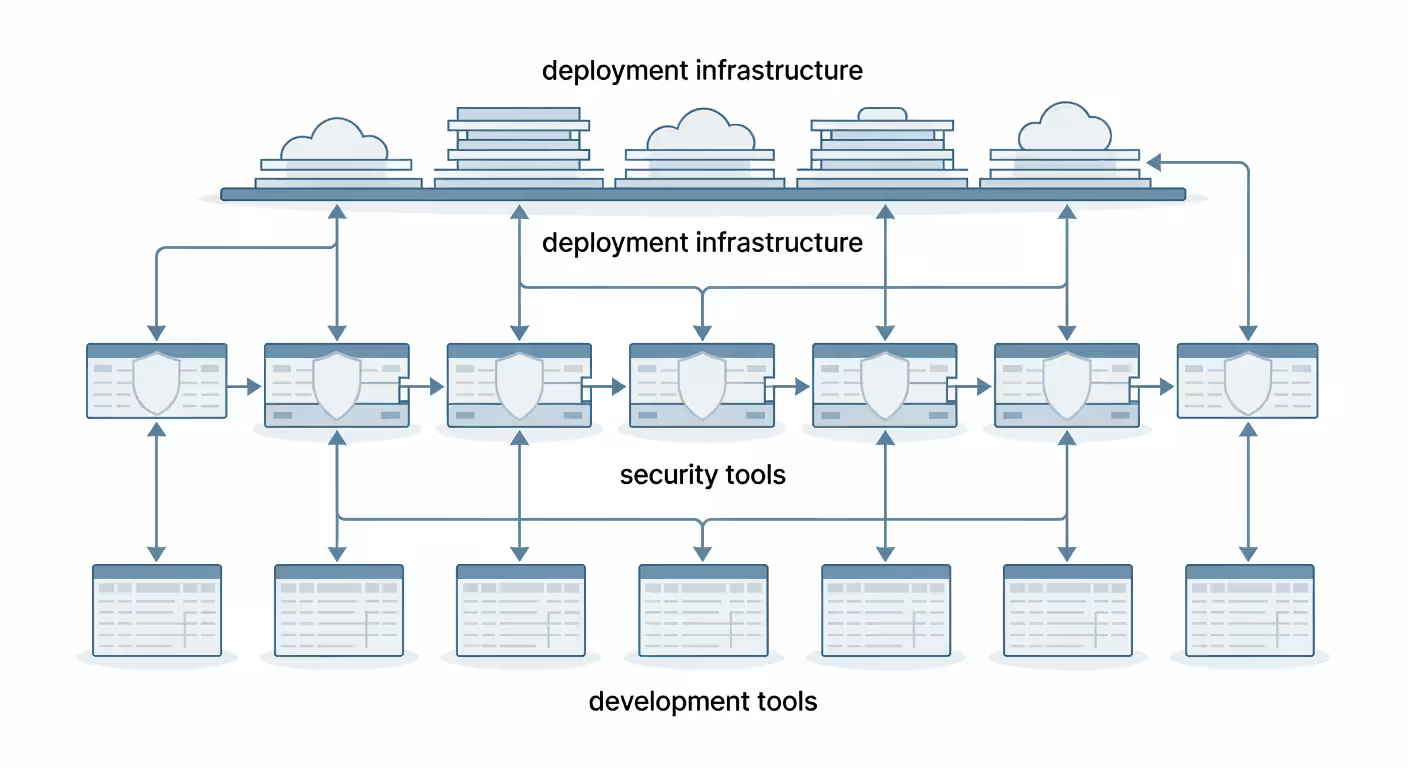
The DevSecOps methodology overview centers on one principle: security is everyone's job, not just the security team's. It's a cultural shift as much as a technical one. The framework integrates security practices into every phase of the software development lifecycle, from planning through deployment and monitoring.
At its core, the DevSecOps framework explained involves three pillars: automation, collaboration, and continuous feedback. Automation ensures security checks happen consistently without manual intervention. Collaboration breaks down silos between development, operations, and security teams. Continuous feedback loops mean developers learn from security findings in real time, not weeks later.
Author: Damien Crowhurst;
Source: aleanetwork.net
Understanding the Shift Left Security Approach
"Shift left" means moving security testing earlier in the development timeline. Picture a timeline running left to right, from code commit to production. Traditional security happened on the right side—final audits before launch. Shift left security tools push those checks to the left, into the coding and build phases.
Why shift left? Economics and efficiency. Fixing a vulnerability in development costs roughly 10x less than patching it in production. Developers still remember the context. The blast radius is tiny. No emergency patches, no customer notifications, no regulatory filings.
Shift left security tools include static application security testing (SAST) that analyzes source code, pre-commit hooks that scan for secrets, and IDE plugins that highlight risky functions as you type. They catch issues before code even reaches version control.
The pattern I see most often is teams starting with one or two shift left tools—usually a secrets scanner and a dependency checker—then expanding as developers realize these tools save time rather than create friction.
Key Stages of a DevSecOps Pipeline
A typical DevSecOps pipeline tools setup covers six stages:
Code stage: Developers write code in their IDE. Tools here include linters with security rules and IDE extensions that flag common vulnerabilities. Some teams use pre-commit hooks to block commits containing secrets or known bad patterns.
Build stage: Code gets compiled and packaged. This is where static analysis tools scan the codebase for vulnerabilities, checking both your code and third-party dependencies. Software composition analysis (SCA) tools inventory every library and flag those with known CVEs.
Test stage: Automated tests run, including security-focused tests. Dynamic application security testing (DAST) tools probe the running application for vulnerabilities like injection flaws or broken authentication. API security testing tools validate endpoints.
Deploy stage: Infrastructure gets provisioned and configured. Infrastructure-as-code scanners check Terraform or CloudFormation templates for misconfigurations. Container image scanners examine Docker images for vulnerabilities before they reach production.
Run stage: The application operates in production. Runtime application self-protection (RASP) tools monitor for attacks in real time. Cloud security posture management (CSPM) platforms continuously audit your cloud environment.
Monitor stage: Security teams track metrics and respond to incidents. Security information and event management (SIEM) systems aggregate logs. Compliance monitoring tools generate audit reports.
Categories of DevSecOps Tools by Pipeline Stage
DevSecOps pipeline tools fall into distinct categories based on what they scan and when they run. Understanding these categories helps you build a toolchain that covers your entire attack surface without redundant overlap.
Static Application Security Testing (SAST): These tools analyze source code without executing it. They parse your codebase, build a model of how data flows through the application, and flag patterns that typically lead to vulnerabilities—SQL injection, cross-site scripting, buffer overflows. SAST tools run fast and catch issues early, but they generate false positives because they lack runtime context.
Dynamic Application Security Testing (DAST): DAST tools test running applications from the outside, like an attacker would. They send malicious payloads to endpoints, try to bypass authentication, and probe for misconfigurations. DAST finds runtime issues SAST misses, but it runs slower and requires a deployed environment.
Software Composition Analysis (SCA): SCA tools inventory your dependencies—every npm package, Python library, or Java JAR—and cross-reference them against vulnerability databases. They also check licenses to ensure compliance. Given that open-source components make up 70–90% of most codebases, SCA has become non-negotiable.
Container Security: These platforms scan container images for vulnerabilities in base images and installed packages. They also enforce policies—blocking images with critical CVEs or those running as root. Some integrate runtime protection to detect anomalous container behavior.
Secrets Management: These tools prevent hardcoded credentials from entering your codebase. They scan commits for API keys, passwords, and tokens, then either block the commit or alert your team. Advanced versions provide vaults where applications retrieve secrets at runtime.
Infrastructure-as-Code (IaC) Scanning: IaC scanners analyze Terraform, CloudFormation, or Kubernetes manifests for security misconfigurations—open S3 buckets, overly permissive IAM roles, unencrypted databases. They catch infrastructure vulnerabilities before deployment.
Compliance and Policy Management: These platforms codify security policies as code, then automatically check whether your applications and infrastructure comply. They generate audit reports for SOC 2, PCI-DSS, HIPAA, or custom frameworks.
API Security Testing: Specialized tools that discover API endpoints, test for authentication flaws, validate input handling, and check for excessive data exposure. APIs represent a growing attack surface that general DAST tools often miss.
Author: Damien Crowhurst;
Source: aleanetwork.net
Comparing Popular DevSecOps Tools
The security devops tools comparison landscape includes dozens of vendors, from open-source projects to enterprise platforms. Here's how leading DevSecOps tools stack up across key dimensions:
Tool Name
Primary Function
Best For
Integration Ease
Pricing Model
Snyk
SCA + container scanning
Teams heavy on open source
Excellent (GitHub, GitLab, CI/CD)
Free tier, then per-developer
Aqua Security
Container + cloud security
Kubernetes-native environments
Good (major cloud platforms)
Quote-based enterprise
GitLab Security
SAST, DAST, SCA (bundled)
Teams already using GitLab
Native to GitLab
Included in Ultimate tier
Checkmarx
SAST + SCA
Large enterprises, compliance-heavy
Moderate (requires setup)
Quote-based enterprise
SonarQube
Code quality + SAST
Developer-focused teams
Excellent (IDE, CI/CD)
Free community, paid tiers
Veracode
SAST, DAST, SCA (platform)
Regulated industries
Moderate (API-driven)
Quote-based enterprise
Prisma Cloud
Cloud + container security
Multi-cloud deployments
Good (cloud-native)
Quote-based enterprise
Semgrep
SAST with custom rules
Security engineers who code
Excellent (lightweight CLI)
Free tier, paid for teams
Snyk dominates the developer-friendly space. It scans dependencies and containers with minimal configuration, integrates into pull requests, and suggests fixes—sometimes even auto-generating them. The free tier covers small teams, making it a common starting point.
GitLab Security appeals to teams already using GitLab for version control and CI/CD. You get SAST, DAST, dependency scanning, and container scanning without adding external tools. The tradeoff: you're locked into the GitLab ecosystem.
Checkmarx and Veracode target enterprises with complex compliance requirements. They offer deep analysis, support for legacy languages, and detailed reporting for auditors. Setup takes longer, and pricing reflects the enterprise focus.
SonarQube straddles the line between code quality and security. Developers appreciate its focus on maintainability and technical debt alongside security findings. The open-source version works well for smaller teams; enterprises pay for advanced security rules and centralized management.
Aqua and Prisma Cloud specialize in cloud-native security. They excel at Kubernetes, serverless, and multi-cloud environments where traditional tools struggle. If your infrastructure lives in containers and cloud services, these platforms provide the deepest visibility.
Semgrep offers a different approach: lightweight, fast, and highly customizable. Security teams write rules in a simple pattern language, tailoring scans to their specific risks. It's popular with teams that want control without vendor lock-in.
The simpler option usually wins here. Teams that start with one or two focused tools—say, Snyk for dependencies and SonarQube for code quality—often get better results than those deploying a sprawling enterprise platform on day one.
Organizations that integrate security testing into the earliest stages of development reduce remediation costs by 70% and accelerate release cycles by 30%. The ROI isn't just financial—it's cultural. Developers become security advocates when tools help rather than hinder their work.
— Martinez Elena
How to Build a Secure DevOps Toolchain
Building a secure DevOps toolchain starts with understanding your current state. What languages and frameworks do you use? Where does your code live? How often do you deploy? What compliance requirements apply?
Start small. Pick one high-impact category and implement it well before adding more. Most teams begin with either SCA (dependency scanning) or secrets management because both deliver immediate value with minimal friction.
Step one: Assess your risk surface. Map your application architecture. Identify third-party dependencies, API endpoints, data stores, and cloud resources. Prioritize based on what attackers would target first—authentication systems, payment processing, customer data.
Step two: Choose tools that fit your stack. A Python shop needs different SAST tools than a Java enterprise. A Kubernetes-native startup needs container security more than a team deploying to VMs. Match tools to your technology, not the other way around.
Step three: Integrate into existing workflows. Developers won't adopt tools that disrupt their flow. Integrate scans into pull requests, not as a separate step. Show findings in GitHub comments or Slack, not in a separate dashboard they'll ignore. Automate everything possible.
Step four: Tune for signal, not noise. Out-of-the-box configurations generate overwhelming false positives. Spend time tuning rules, suppressing irrelevant findings, and adjusting severity thresholds. A tool that cries wolf on every scan gets disabled.
Step five: Define clear ownership. Who triages findings? Who decides what gets fixed immediately versus backlogged? Who maintains the toolchain? Without clear ownership, DevSecOps tools become shelfware.
Step six: Measure and iterate. Track metrics like mean time to remediation, percentage of releases blocked by security issues, and developer satisfaction. Use data to refine your toolchain over time.
Team size matters. Small teams (under 20 developers) should prioritize simplicity and low maintenance. Open-source tools with good defaults work well. Mid-size teams (20–100 developers) benefit from commercial tools with support and better integration. Large enterprises need platforms that scale, provide centralized management, and generate compliance reports.
Tech stack considerations: Polyglot environments need tools that support multiple languages. Microservices architectures need container and API security. Serverless applications need cloud security posture management. Legacy monoliths need SAST tools with deep language support.
Compliance requirements drive tool selection for regulated industries. Healthcare needs HIPAA compliance reporting. Finance needs PCI-DSS validation. Government contractors need FedRAMP-authorized tools. Check certifications before committing.
Author: Damien Crowhurst;
Source: aleanetwork.net
Common Mistakes When Implementing DevSecOps Tools
The biggest mistake? Tool sprawl. Teams add scanner after scanner, each covering a narrow slice of security, until developers spend more time triaging alerts than writing code. You don't need eight tools. You need the right three or four, properly configured.
Ignoring developer experience: Security teams often select tools based on detection capabilities alone, ignoring usability. If a tool requires developers to leave their IDE, navigate a clunky web portal, and decipher cryptic findings, it won't get used. Developer experience isn't optional—it determines adoption.
Treating all findings equally: Not every vulnerability deserves immediate attention. A critical SQL injection in your authentication endpoint? Drop everything. A low-severity issue in a deprecated internal tool? Backlog it. Without severity-based workflows, teams either fix everything (burning out) or ignore everything (getting breached).
Skipping the tuning phase: Default configurations optimize for coverage, not signal-to-noise ratio. They flag every possible issue, including thousands of false positives. Teams that skip tuning drown in alerts, miss real threats, and eventually disable the tool.
Lack of security champion buy-in: Mandating tools from the top down breeds resistance. A better approach: identify security champions within development teams, give them early access to tools, incorporate their feedback, and let them evangelize to peers. Bottom-up adoption sticks.
Forgetting runtime security: Shift left doesn't mean ignore right. Most toolchains focus on pre-production scanning but neglect runtime protection. Attackers exploit zero-days, misconfigurations, and logic flaws that static analysis can't catch. Include runtime monitoring in your toolchain.
Poor integration with incident response: Security tools that generate alerts but don't feed into your incident response workflow create blind spots. When a scanner flags a critical vulnerability, what happens next? Who gets paged? What's the SLA for remediation? Define these processes before deploying tools.
Measuring the wrong metrics: Counting vulnerabilities found or scans run measures activity, not outcomes. Better metrics: percentage of vulnerabilities remediated within SLA, mean time from detection to fix, and security issues found in production (which should trend toward zero).
One team I know deployed five security scanners in their first month. Developers got hundreds of alerts daily, ignored most of them, and missed a critical authentication bypass that made it to production. They spent the next quarter consolidating to two well-tuned tools and saw better results.
FAQ: DevSecOps Tools Questions Answered
What is the difference between DevOps and DevSecOps tools?
DevOps tools focus on automating software delivery—version control, CI/CD, infrastructure provisioning, monitoring. They help you ship faster. DevSecOps tools add a security layer to that automation, scanning for vulnerabilities, enforcing policies, and blocking risky deployments. Think of DevSecOps tools as specialized security plugins for your DevOps pipeline. They integrate with your existing CI/CD platform, version control system, and deployment tools, but their job is finding and preventing security issues rather than speeding up delivery.
Do I need multiple DevSecOps tools or one platform?
It depends on your environment's complexity and your team's maturity. Small teams often do well with an all-in-one platform like GitLab Security or a comprehensive tool like Snyk that covers multiple categories. You get simpler management and fewer integrations to maintain. Larger teams or those with specialized needs typically use multiple best-of-breed tools—one for SAST, another for container security, a third for cloud posture management. This approach offers deeper capabilities in each area but requires more orchestration. Start with one or two focused tools and expand only when you've maximized their value.
How much do DevSecOps tools typically cost?
Pricing varies wildly. Open-source tools like SonarQube Community Edition and Semgrep cost nothing but require internal resources for setup and maintenance. Developer-focused SaaS tools like Snyk start with free tiers for small teams, then charge $50–200 per developer per month for paid plans. Enterprise platforms like Checkmarx, Veracode, and Prisma Cloud use quote-based pricing, typically starting at $50,000–100,000 annually for mid-size deployments and scaling into six figures for large organizations. Factor in implementation costs, training, and ongoing tuning—the tool license is often just 30–50% of total cost of ownership.
Can DevSecOps tools integrate with CI/CD pipelines?
Yes, and they must. Modern DevSecOps tools are built for CI/CD integration. They provide plugins for Jenkins, GitHub Actions, GitLab CI, CircleCI, Azure DevOps, and other popular platforms. Most expose APIs or CLI tools you can call from any pipeline. Integration typically involves adding a few lines to your pipeline configuration to trigger scans, retrieve results, and enforce policies. The best tools fail builds when they find critical issues, post findings as pull request comments, and track remediation over time. If a tool doesn't integrate easily with your CI/CD platform, skip it—manual security checks don't scale.
What are shift left security tools?
Shift left security tools are designed to catch vulnerabilities as early as possible in development. They include IDE plugins that highlight security issues as you type, pre-commit hooks that scan for secrets before code reaches version control, SAST tools that analyze code during pull requests, and SCA tools that flag vulnerable dependencies at build time. The defining characteristic: they run before code reaches production, often before it even reaches your main branch. The goal is catching issues when they're cheapest and easiest to fix—while the developer still has context and the code hasn't propagated through your entire system.
How do I convince developers to use DevSecOps tools?
Show, don't tell. Integrate one tool that solves a real problem developers already care about—dependency vulnerabilities are a good starting point because developers hate getting paged for library CVEs. Make sure the tool is easy to use, generates minimal false positives, and provides actionable fix guidance. Highlight time saved, not compliance achieved. Run a pilot with friendly developers, incorporate their feedback, and let them evangelize to peers. Avoid mandates from security teams. Celebrate wins publicly when tools catch issues before production. Measure and share metrics on reduced incident response time. Developers adopt tools that make their lives easier, not tools forced upon them.
Building a DevSecOps practice isn't about buying tools—it's about changing how your team thinks about security. The right DevSecOps tools make security invisible to developers most of the time, surfacing only when it matters. Start small, focus on integration and usability, and expand as your team's security maturity grows. The goal isn't perfect security—it's continuous improvement that keeps pace with your delivery velocity.
Containerization packages applications with their dependencies into lightweight, portable units. This comprehensive guide explains how containers work, compares them to virtual machines, covers Docker and orchestration platforms, and shows you how to implement container-based deployment in modern DevOps workflows.
Performance monitoring tools track application response times, server health, and infrastructure metrics to catch problems before users notice. This guide covers how monitoring works, types of tools available, key features to evaluate, and common implementation mistakes to avoid.
An API platform is the complete ecosystem that handles routing, security, lifecycle management, and governance for your APIs. Understand the core components—gateway, manager, portal, analytics—and learn how to evaluate platforms based on scalability, developer experience, and integration capabilities.
Comprehensive guide to test automation for QA teams. Covers automation frameworks, popular testing tools comparison, best practices for maintainable test suites, continuous testing in CI/CD pipelines, and common mistakes to avoid when implementing automated testing strategies.
The content on this website is provided for general informational and educational purposes only. It is intended to explain concepts related to AI tools, agents, developer infrastructure, coding assistants, APIs, and productivity workflows.
All information on this website, including articles, guides, and examples, is presented for general educational purposes. Outcomes and tool performance may vary depending on implementation, skill level, and use case.
This website does not provide professional AI consulting, development services, or guarantees of results, and the information presented should not be used as a substitute for consultation with qualified AI or software development professionals.
The website and its authors are not responsible for any errors or omissions, or for any outcomes resulting from decisions made based on the information provided on this website.