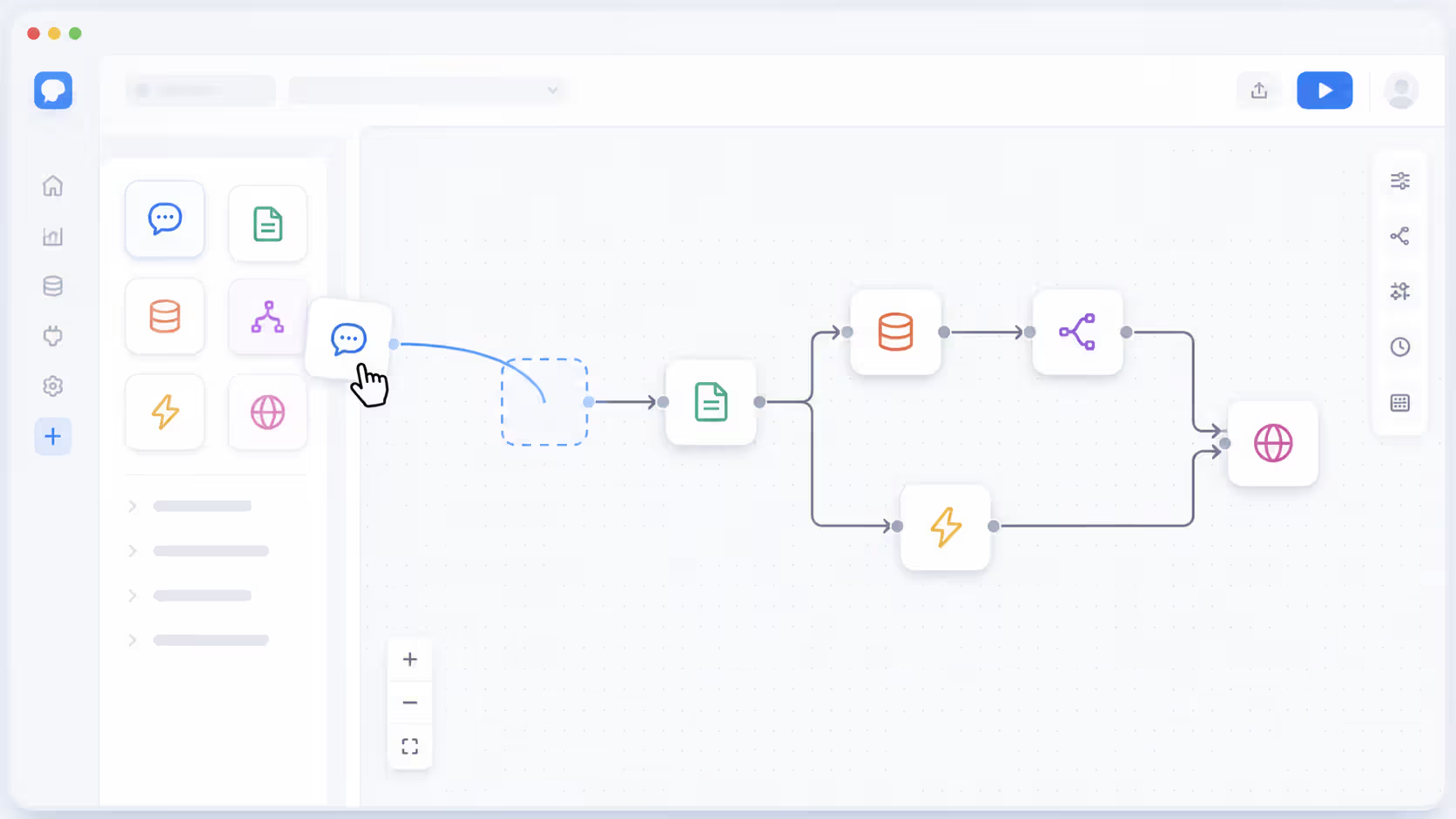
Low code platforms have reshaped how organizations build software. Instead of writing thousands of lines of code from scratch, teams now assemble applications using visual interfaces and pre-built components. This approach cuts development time dramatically while opening software creation to a broader audience.
The shift isn't just about speed. It's about who can participate in building solutions. When business analysts and department heads can prototype their own tools, IT bottlenecks shrink. Professional developers focus on complex problems while others handle routine automation.
But low code isn't a magic wand. Understanding what it does well—and where it falls short—helps you decide if it fits your needs.
Understanding Low Code Platforms
A low code platform provides a visual development environment where you build applications by configuring components rather than writing extensive code. Think of it as assembling software from pre-made blocks instead of manufacturing each piece yourself.
The core of any low code platform is its visual interface. You drag elements onto a canvas—forms, buttons, data tables, workflows—and connect them through simple logic rules. Behind the scenes, the platform generates the actual code. You see the blueprint; the platform handles the construction.
Pre-built templates accelerate this process further. Need a customer portal? Start with a template that includes login functionality, user dashboards, and basic data management. Customize from there rather than building from zero.
Most platforms include component libraries stocked with common functions: payment processing, email notifications, database connections, API integrations. These modules snap together like LEGO bricks. The platform maintains compatibility and handles the technical plumbing.
Author: Adrian Westmere;
Source: aleanetwork.net
What separates a low code solution from a no-code tool? Extensibility. Low code platforms let developers write custom code when needed. You're not locked into only what the visual tools provide. This escape hatch matters when requirements get specific or complex.
The architecture typically follows a three-layer model. The presentation layer handles what users see and interact with. The logic layer processes business rules and workflows. The data layer manages information storage and retrieval. Low code platforms abstract these layers behind visual tools, but they're still there.
By 2026, low code platforms have become the default choice for 70% of new business applications, fundamentally changing how enterprises approach digital transformation and resource allocation.
— Wong Jason
How Low Code Development Works
The process starts with design. You map out what your application needs to do—which screens, what data flows between them, who has access to what. This planning phase looks similar across all development approaches.
Then you build using the visual interface. Drag a form component onto your canvas. Add input fields by clicking and configuring properties in a sidebar—field name, data type, validation rules. No typing out HTML or form handlers.
Want that form to trigger an action when submitted? Draw a connection line to a workflow component. Configure the workflow: send an email notification, update a database record, call an external API. The platform translates these visual configurations into executable code.
Here's where low code differs from pure no-code: when the visual tools can't express what you need, you drop into code. Maybe you need a custom calculation that's too complex for the formula builder. You write a JavaScript function or use the platform's scripting language. That function becomes a component you can reuse elsewhere.
Integration capabilities define how useful a low code platform really is. Modern platforms connect to hundreds of external services through pre-built connectors. Need to pull data from Salesforce, push updates to Slack, and store files in AWS? Configure the connectors with your credentials and map the data fields. The platform handles authentication, error handling, and data formatting.
Deployment is typically one-click. The platform packages your application, provisions the necessary infrastructure, and pushes it live. Updates follow the same pattern—make changes in the development environment, test them, then deploy. Version control and rollback features protect against mistakes.
Testing happens throughout. Most platforms include preview modes where you interact with your application as end users would. You spot issues before deployment. Some platforms generate test cases automatically based on your workflows.
The pattern I see most often is teams starting with the visual tools for 80% of their application, then using custom code for the specialized 20%. This balance delivers speed without sacrificing capability.
Low Code vs No Code vs Traditional Development
The boundaries between these approaches matter when you're choosing a path forward. Each serves different needs and requires different skills.
Factor
Low Code
No Code
Traditional Development
Technical Skill Required
Basic coding knowledge helpful but not mandatory; can extend with custom code
None; purely visual configuration
Extensive programming expertise required
Development Speed
5-10x faster than traditional for standard applications
Fastest for simple applications; 10-20x faster
Slowest; complete control but time-intensive
Customization Level
High; visual tools plus custom code options
Limited to platform capabilities
Unlimited; build anything technically possible
Cost
Platform subscription plus developer time; mid-range
Lowest upfront; subscription-based
Highest; full development team salaries
Best For
Enterprise applications, customer portals, workflow automation, mobile apps
Platform handles infrastructure; custom code needs traditional maintenance
Minimal; mostly configuration updates
High; full responsibility for all layers
No-code platforms target business users completely. If you can use a spreadsheet, you can build a no-code app. But you're confined to what the platform offers. Need something it doesn't support? You're stuck.
Low code splits the difference. Business users can build simpler applications independently. When complexity increases, developers step in to add custom logic. This flexibility extends the platform's useful range.
Traditional development gives you a blank canvas. You can optimize every detail, use any technology, build exactly what you envision. But you'll pay for that freedom in time and money. A simple CRUD application that takes two weeks in low code might consume three months in traditional development.
Speed differences compound over time. Low code platforms handle security patches, infrastructure scaling, and compatibility updates automatically. Traditional applications require ongoing maintenance for all these areas.
The simpler option usually wins here—unless your requirements truly demand custom development. Most business applications don't.
Who Uses Low Code Solutions
Professional developers were the first adopters, ironically. They saw low code as a way to eliminate repetitive work. Why hand-code another admin panel when a low code platform generates one in minutes? Developers use low code to scaffold applications quickly, then customize the complex parts.
Citizen developers—people without formal programming training who build applications—represent the fastest-growing user segment. These are business analysts, operations managers, department heads who understand their domain deeply. They know what tools would help their teams. Low code lets them build those tools without waiting for IT resources.
Author: Adrian Westmere;
Source: aleanetwork.net
A marketing manager might build a campaign tracking dashboard that pulls data from three different systems. An HR specialist could create an onboarding workflow that automates paperwork and training assignments. A warehouse supervisor might design an inventory alert system. None of these people are programmers, but low code makes them builders.
IT teams use low code strategically. They establish governance frameworks—security standards, data access policies, approved integrations—then empower departments to build within those guardrails. IT reviews and approves applications but doesn't build every single one. This model scales far better than traditional IT as bottleneck.
Business analysts occupy a sweet spot. They already document requirements and design workflows. Low code platforms let them prototype solutions directly rather than writing specifications for developers to interpret. The prototype becomes the application after refinement.
Real-world scenario: A regional bank needed a loan application system for small business clients. Their IT backlog stretched 18 months. Instead of waiting, the commercial lending team used a low code platform to build a working prototype in three weeks. IT reviewed it, added security enhancements and system integrations, and the application went live two months later. Traditional development would've taken over a year.
Another example: A manufacturing company's quality control team tracked defects in spreadsheets shared via email. They built a low code mobile app where floor workers photograph defects, tag them by location and type, and trigger automated workflows for corrective action. The whole project took one person six weeks part-time.
The common thread? Domain experts solving their own problems. They know the requirements intimately because they live them daily. Low code removes the technical barrier between problem and solution.
Benefits and Limitations of Low Code Software Development
Key Advantages
Speed dominates the benefits list. Applications that traditionally took months now take weeks or days. This acceleration comes from reusing components, automating infrastructure setup, and eliminating boilerplate code. You're not building from scratch every time.
Cost savings follow speed. Fewer developer hours means lower labor costs. Platforms handle hosting and infrastructure, often more efficiently than custom deployments. Maintenance becomes configuration updates rather than code rewrites.
Agility improves dramatically. Business requirements change constantly. Low code applications adapt faster because modifications happen through visual configuration rather than code changes, testing, and deployment cycles. You can iterate based on user feedback in days instead of months.
The democratization of development might be the biggest long-term benefit. When more people can build solutions, innovation accelerates. Good ideas don't die in IT backlogs. Departments solve their own problems rather than competing for limited development resources.
Integration capabilities in modern low code platforms eliminate a traditional pain point. Connecting systems used to require custom API development and ongoing maintenance. Now you configure pre-built connectors. The platform handles version changes and compatibility issues.
Governance and compliance become easier to enforce. Platforms provide centralized control over security policies, data access, and deployment standards. Every application built on the platform inherits these controls automatically. Compare that to traditional development where each team might implement security differently.
Scalability comes built-in. The platform infrastructure scales automatically as usage grows. You don't architect for scale upfront or scramble to optimize when traffic spikes. The platform handles it.
Common Drawbacks and Constraints
Vendor lock-in ranks as the primary concern. Your application depends on the platform's proprietary environment. Migrating to another platform or to traditional code requires substantial rework. You're betting on the vendor's continued viability and fair pricing.
Performance limitations exist. Low code platforms optimize for flexibility and ease of use, not maximum performance. If you're building a high-frequency trading system or a real-time gaming platform, low code probably isn't the right choice. The abstraction layers that make development easy add processing overhead.
Author: Adrian Westmere;
Source: aleanetwork.net
Customization ceilings eventually appear. Platforms support common use cases extremely well. Edge cases and highly specialized requirements strain the visual tools. You end up writing more custom code, reducing the low code advantages.
The learning curve for specific platforms can be steep. While low code is easier than traditional development, each platform has its own concepts, terminology, and best practices. Teams invest time learning the platform's way of doing things.
Governance challenges emerge as adoption spreads. Without proper oversight, you get "shadow IT" sprawl—dozens of unmanaged applications with inconsistent security, unclear ownership, and integration chaos. Organizations need governance frameworks before they scale low code adoption.
Hidden costs sometimes surprise adopters. Platform subscriptions scale with users, transactions, or compute resources. As your application succeeds and usage grows, costs can increase significantly. That simple app that saved money initially might become expensive at scale.
Debugging custom code in low code platforms can be harder than in traditional development. The platform's abstraction layers obscure what's happening under the hood. When something breaks in the generated code or in the interaction between visual components and custom code, troubleshooting gets tricky.
Popular Use Cases for Low Code Automation Platforms
Workflow automation represents the most common low code use case. Businesses run on processes—approval chains, data collection, task routing, notifications. Low code platforms excel at modeling and automating these workflows without custom development.
A typical example: expense report approval. An employee submits expenses through a mobile form. The low code application routes it to their manager, escalates if not approved within 48 hours, integrates with accounting systems for reimbursement, and archives everything for audit trails. Building this traditionally might take weeks; low code delivers it in days.
Internal tools proliferate on low code platforms. Every organization needs custom dashboards, admin panels, data entry forms, and reporting tools. These applications are important but not differentiating. Low code delivers them quickly so development teams can focus on customer-facing features.
Customer portals and self-service applications work well in low code. Clients need to check order status, update account information, submit support tickets, access documents. These portals integrate multiple backend systems behind a unified interface. Low code platforms handle the integration complexity while letting you customize the user experience.
Mobile applications for field workers benefit from low code's rapid development cycle. A utility company might build an app for technicians to access service history, update work orders, and capture photos—all while offline. The low code platform handles data synchronization, offline storage, and backend integration.
Legacy system modernization often starts with low code. Rather than rewriting an old mainframe application completely, teams build a modern interface layer using low code. The new interface connects to the legacy system's APIs or database, giving users a contemporary experience while preserving the stable backend logic.
Data collection and survey applications deploy quickly on low code platforms. Whether it's customer feedback, compliance checklists, or field research, low code handles form creation, conditional logic, data validation, and storage without custom development.
Integration platforms built on low code connect disparate systems. When your CRM doesn't talk to your ERP, and your marketing automation lives in its own silo, a low code integration layer can shuttle data between them, transform formats, and trigger actions across systems.
The pattern across these use cases? They're all important business applications that don't require cutting-edge technology or massive scale. They need to work reliably, integrate with existing systems, and adapt as requirements evolve. That's low code's sweet spot.
Choosing the Right Low Code Solution
Scalability requirements should drive your platform evaluation. How many users will your applications serve? What transaction volumes do you expect? Some platforms handle small team applications beautifully but struggle at enterprise scale. Others are built for massive deployments but feel overcomplicated for simple needs.
Security and compliance capabilities vary significantly between platforms. If you're handling sensitive data—healthcare records, financial information, personal data under privacy regulations—verify the platform meets your security standards. Look for certifications like SOC 2, ISO 27001, HIPAA compliance where relevant. Check how the platform handles authentication, authorization, encryption, and audit logging.
Integration ecosystem matters immensely. List the systems your applications need to connect with. Does the platform provide pre-built connectors for them? How difficult is it to build custom integrations when needed? A platform with weak integration capabilities will frustrate you constantly.
Vendor lock-in deserves serious consideration. Can you export your application logic? Does the platform use proprietary languages or standard ones? What happens to your applications if the vendor discontinues the platform or raises prices dramatically? Some platforms offer more exit options than others.
Governance and control features become critical as adoption scales. Look for role-based access control, application lifecycle management, centralized monitoring, and policy enforcement capabilities. Without these, you'll struggle to manage multiple applications across different teams.
Customization depth determines how far you can push the platform. Evaluate how easily you can add custom code. What languages does it support? Can you bring in external libraries? Some platforms offer deep customization; others keep you on rails.
Total cost of ownership includes more than the subscription price. Factor in training time, the cost of custom development when needed, integration expenses, and scaling costs as usage grows. A cheaper platform that requires more custom work might cost more overall than a pricier platform with richer features.
Community and support resources indicate platform maturity. Active user communities, comprehensive documentation, abundant tutorials, and responsive vendor support make your development journey smoother. Platforms with weak communities leave you solving problems alone.
Try before you commit. Most platforms offer free trials or freemium tiers. Build a prototype of a real application you need. You'll quickly discover whether the platform's approach matches your team's thinking and whether it handles your requirements comfortably.
Author: Adrian Westmere;
Source: aleanetwork.net
The best platform for you depends on your specific context. A startup building customer-facing products has different needs than an enterprise IT department automating internal processes. Match the platform's strengths to your priorities.
FAQ: Low Code Questions Answered
Can low code platforms handle complex enterprise applications?
Yes, but with qualifications. Modern low code platforms successfully power complex enterprise applications including CRM systems, supply chain management tools, and customer portals serving thousands of users. They handle sophisticated business logic, complex workflows, and integration with multiple backend systems.
The limitation appears when applications require highly specialized algorithms, extreme performance optimization, or functionality far outside standard business application patterns. A complex enterprise application that fits common patterns—data management, workflow automation, user interfaces, system integration—works well on low code. One that needs custom machine learning models, real-time data processing at millisecond latency, or novel technical capabilities might strain the platform.
Many enterprises use a hybrid approach: build the core application on low code for speed and flexibility, then integrate custom-developed components for specialized requirements. This combination delivers faster time-to-market while preserving the ability to solve unique technical challenges.
Do I need coding skills to use a low code platform?
Not for basic applications, but coding knowledge expands what you can accomplish. Someone without programming experience can build functional applications using the visual tools—forms, workflows, basic business logic, and pre-built integrations all work through configuration rather than code.
As requirements grow more complex, coding ability becomes helpful. Custom calculations, specialized data transformations, unique UI behaviors, and advanced integrations often require dropping into code. The platform provides the framework and handles infrastructure, but you're writing functions or scripts to implement specific logic.
Think of it as a spectrum. Simple applications need zero coding. Moderate complexity might require occasional small scripts. Complex applications use visual tools for structure and standard components, with custom code filling gaps where the visual tools fall short. The platform reduces the total code you write by roughly 70-80% compared to traditional development, but rarely eliminates it entirely for sophisticated applications.
Is low code secure enough for sensitive business data?
Security depends more on the platform you choose and how you configure it than on the low code approach itself. Reputable enterprise low code platforms implement security at multiple levels: encrypted data transmission and storage, role-based access controls, audit logging, secure authentication, and regular security testing.
In some ways, low code can improve security. Platforms enforce security policies consistently across all applications built on them. Traditional development leaves more room for individual developers to make security mistakes. Centralized management makes it easier to apply security patches and updates across your application portfolio.
That said, you're trusting the platform vendor's security implementation. Evaluate their security certifications, review their security documentation, understand where data is stored and how it's protected. For highly sensitive data, verify the platform meets your industry's compliance requirements—HIPAA for healthcare, PCI DSS for payment data, GDPR for European personal data.
The biggest security risk often comes from poor configuration rather than platform limitations. Granting overly broad data access, failing to implement proper authentication, or exposing APIs without proper controls creates vulnerabilities regardless of the development approach.
How much does low code development cost compared to traditional coding?
Low code typically costs 40-70% less than traditional development when you account for all factors. The savings come from multiple sources: faster development time means fewer labor hours, platform infrastructure costs less than custom hosting and DevOps, maintenance requires less specialized skill, and updates deploy faster.
A traditional development project might require a team of developers, a project manager, DevOps engineers, and QA testers working for months. The equivalent low code project might need one or two people working for weeks. Even accounting for platform subscription costs, the total expenditure drops significantly.
However, costs vary based on project complexity and scale. Simple applications show the biggest cost advantages—sometimes 80-90% savings. Complex applications with extensive custom code requirements narrow the gap. At very large scale, platform subscription costs based on users or transactions can grow substantially.
Consider long-term costs too. Traditional applications require ongoing maintenance, security patching, infrastructure management, and compatibility updates—all of which consume developer time indefinitely. Low code platforms handle much of this automatically, reducing long-term costs even if upfront savings are modest.
Can low code applications integrate with existing systems?
Integration is one of low code's strongest capabilities. Modern platforms provide pre-built connectors to hundreds of common business systems—CRMs, ERPs, databases, cloud services, marketing platforms, and more. You configure these connectors with credentials and map data fields rather than writing integration code from scratch.
For systems without pre-built connectors, most platforms let you build custom integrations using APIs. If your legacy system exposes a REST API or SOAP web service, the low code platform can connect to it. You configure the API endpoints, authentication method, and data mapping through the platform's tools.
Database integration works similarly. Platforms connect to SQL databases, NoSQL databases, and cloud data warehouses. You can read and write data, execute queries, and trigger database operations from your low code applications.
The integration challenge usually isn't technical capability but rather complexity management. When an application integrates with five or ten different systems, managing data flow, handling errors, and maintaining consistency requires careful design regardless of the development approach. Low code simplifies the technical implementation but doesn't eliminate the need for good integration architecture.
What's the difference between a citizen developer and a professional developer in low code?
Citizen developers are business users without formal programming training who build applications to solve problems in their domain. They're analysts, managers, or specialists who understand business processes deeply and use low code platforms to create tools for their teams. They work primarily with visual tools and pre-built components, rarely writing custom code.
Professional developers have programming training and experience. They use low code platforms to accelerate development, building applications faster than traditional coding allows. When applications need custom logic, specialized integrations, or performance optimization, professional developers write the code. They understand the platform's underlying architecture and can extend it beyond what visual tools provide.
Both groups create value, but in different ways. Citizen developers excel at applications within their domain expertise—a marketing automation workflow, an HR onboarding process, a sales tracking dashboard. They build solutions that might never reach IT's priority list but genuinely improve their team's efficiency.
Professional developers tackle more complex, cross-functional applications that require technical sophistication. They also establish governance frameworks, create reusable components for citizen developers, and provide technical support when citizen developers hit limitations.
The best organizations foster both groups. Citizen developers solve departmental needs quickly. Professional developers build enterprise-scale applications and enable citizen developers through governance, shared components, and technical guidance. This division of labor maximizes the value from both technical expertise and domain knowledge.
Low code has earned its place in the modern development toolkit. It won't replace traditional programming for every scenario, but it handles a huge range of business applications faster and cheaper than custom development. As platforms mature and capabilities expand, that range grows wider. For most organizations, the question isn't whether to adopt low code, but how to integrate it strategically alongside existing development approaches.
Regression testing prevents code changes from breaking existing functionality. This guide covers regression test types, manual vs. automated approaches, building effective test suites, and implementing regression testing in agile and CI/CD environments.
Discover how DevOps automation transforms software delivery through automated pipelines, CI/CD tools, and intelligent deployment strategies. Learn which tools to use, how to implement continuous deployment, and best practices that reduce errors while accelerating releases.
Discover how generative AI is changing software development in practice. This guide covers workflow integration, code quality concerns, tool comparisons, and real-world implementation strategies for development teams looking to adopt AI coding assistants effectively.
Master API testing with this comprehensive guide covering testing methods, popular tools, REST API tutorials, and best practices. Learn how to test APIs effectively, automate your testing workflow, and avoid common mistakes that compromise software quality.
The content on this website is provided for general informational and educational purposes only. It is intended to explain concepts related to AI tools, agents, developer infrastructure, coding assistants, APIs, and productivity workflows.
All information on this website, including articles, guides, and examples, is presented for general educational purposes. Outcomes and tool performance may vary depending on implementation, skill level, and use case.
This website does not provide professional AI consulting, development services, or guarantees of results, and the information presented should not be used as a substitute for consultation with qualified AI or software development professionals.
The website and its authors are not responsible for any errors or omissions, or for any outcomes resulting from decisions made based on the information provided on this website.