API testing has become non-negotiable in modern software development. While your users interact with polished interfaces, APIs power everything behind the scenes—from payment processing to data synchronization. When an API breaks, the entire application can fail, often in ways that UI testing won't catch.
You can't rely on front-end testing alone anymore. APIs handle the actual business logic, data validation, and system integration. Testing them directly gives you faster feedback, better coverage, and fewer production surprises.
What Is API Testing and Why It Matters
API testing validates the functionality, reliability, performance, and security of application programming interfaces. Unlike UI testing, which simulates user clicks and form submissions, API testing sends requests directly to endpoints and verifies the responses—no browser required.
The difference matters more than you might think. UI tests are slow, brittle, and test multiple layers at once. API tests run in milliseconds, pinpoint exact failure locations, and catch issues before they reach the interface layer.
Here's what makes API testing different from traditional testing approaches. When you test through the UI, you're validating the presentation layer, the business logic, and the data layer simultaneously. If something fails, you have to dig through multiple components to find the root cause. API tests isolate the business logic and data handling, making debugging straightforward.
The business value shows up in three areas: speed, cost, and quality. Teams practicing API testing find bugs 6-8 times faster than UI-only approaches. You'll spend less on test maintenance because API contracts change far less frequently than user interfaces. And you can automate regression testing completely, running thousands of test cases in minutes instead of hours.
Modern applications often expose dozens or hundreds of API endpoints. Each endpoint accepts specific parameters, validates data, processes requests, and returns structured responses. One misconfigured endpoint can expose sensitive data, corrupt databases, or crash dependent services.
How API Testing Works
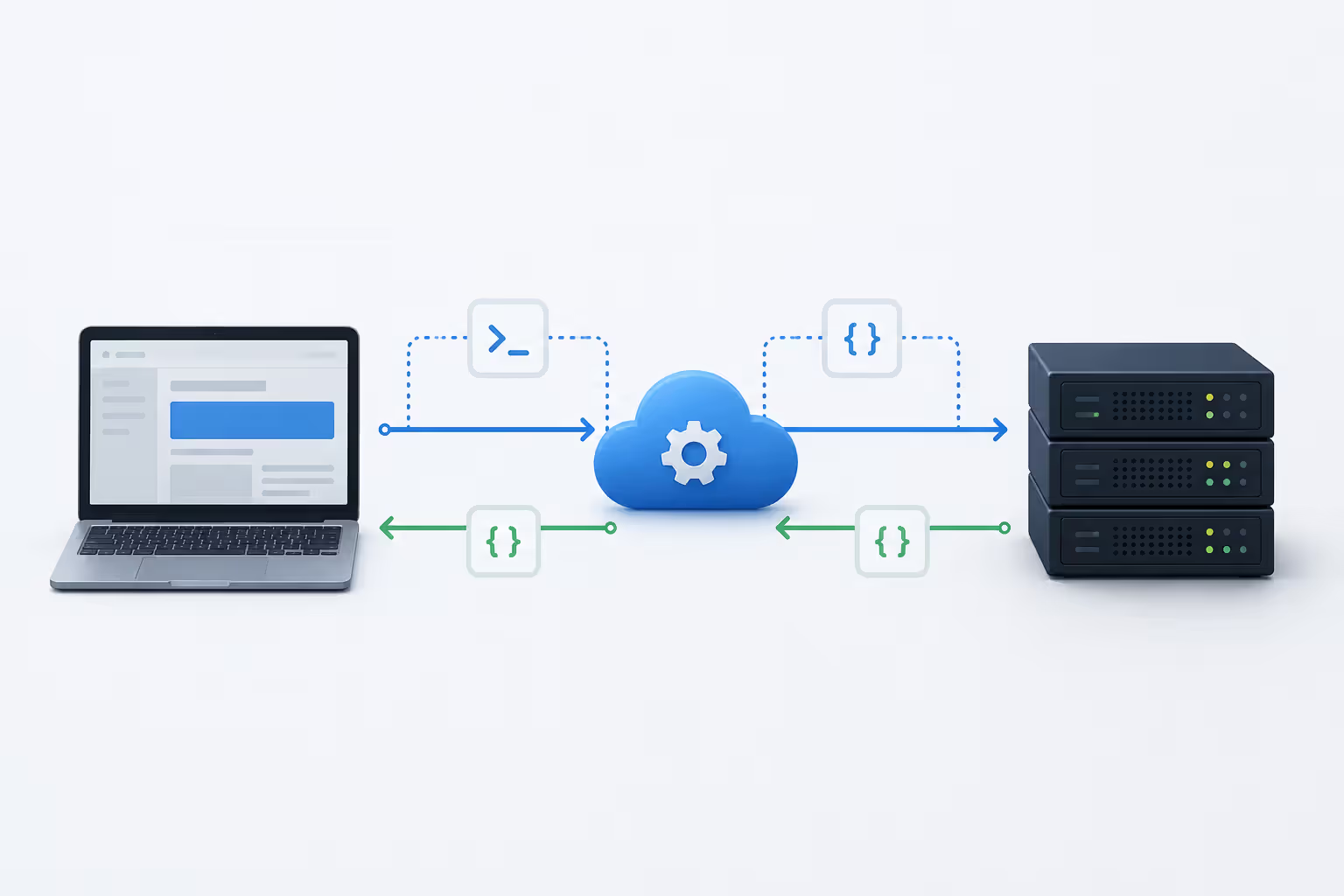
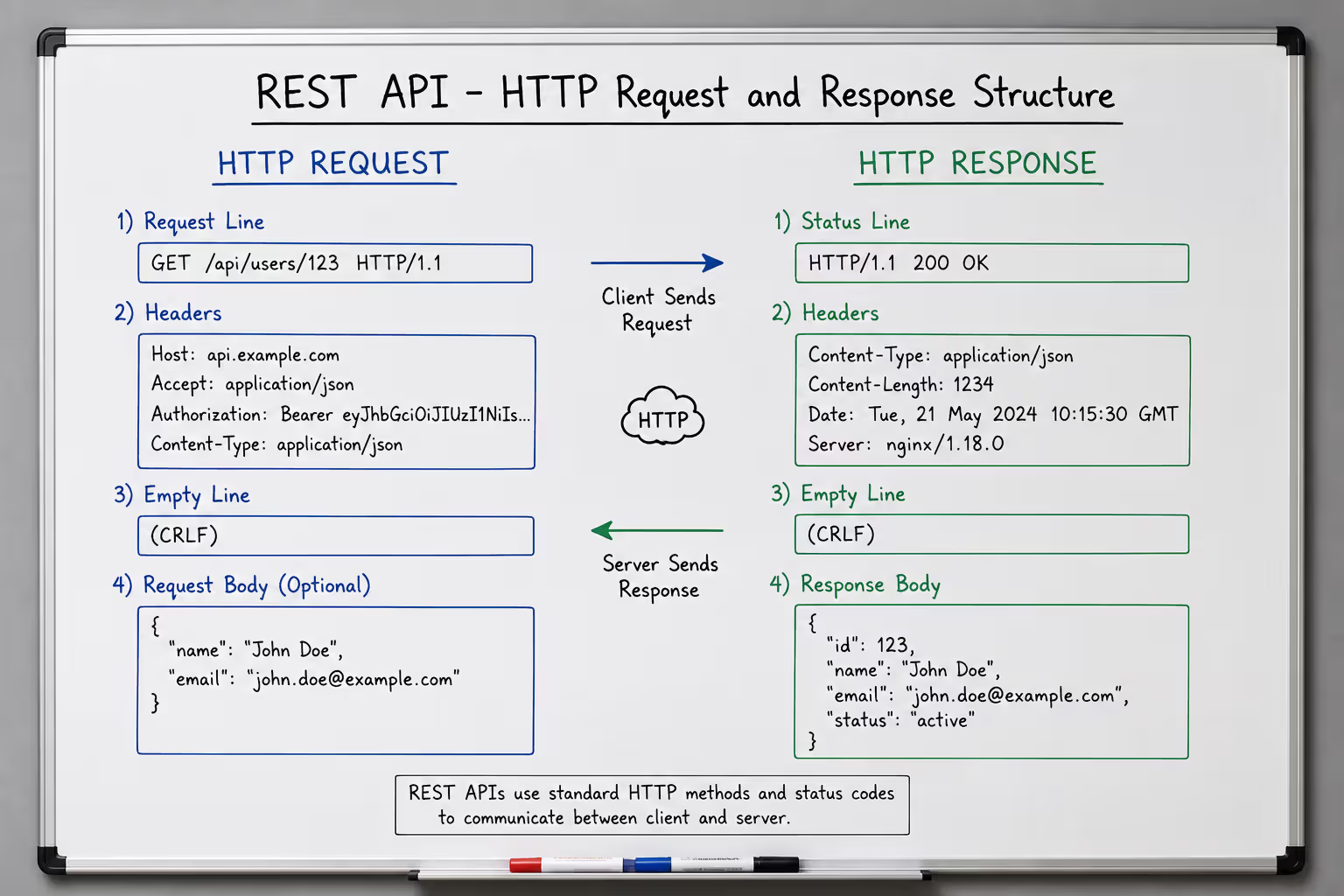
API testing follows a request-response pattern. Your test client sends an HTTP request to an endpoint with specific headers, authentication credentials, and payload data. The API processes that request and returns a response containing a status code, headers, and usually a JSON or XML body.
The technical flow looks simple but contains multiple validation points. Before sending a request, you need proper authentication—often an API key, OAuth token, or JWT. The request must include correct headers specifying content type, accepted response formats, and any custom parameters the API requires.
Once the API receives your request, it validates the input, executes business logic, queries databases or external services, and constructs a response. Your test then validates multiple aspects of that response: the HTTP status code, response time, header values, payload structure, and data accuracy.
Key Components of an API Test
Every API test needs five core elements. First, the endpoint URL—the specific address where the API listens for requests. Second, the HTTP method (GET, POST, PUT, DELETE, PATCH) that defines the operation type. Third, request headers containing metadata like content type and authorization tokens.
Fourth comes the request body or parameters. For POST and PUT requests, you'll send JSON or XML payloads with the data the API should process. GET requests typically use query parameters appended to the URL. Fifth, you define expected outcomes: the status code you anticipate, required fields in the response, data type validation, and acceptable response times.
Authentication deserves special attention. Most production APIs won't accept unauthenticated requests. You'll work with API keys passed in headers, OAuth 2.0 flows requiring token exchange, or JWT tokens containing encoded user claims. Your tests must handle token generation, refresh logic, and expiration scenarios.
Status codes tell you what happened at a glance. A 200 means success, 201 indicates successful resource creation, 400 signals bad request data, 401 means authentication failed, 403 indicates insufficient permissions, 404 means the resource doesn't exist, and 500 signals a server error. Your tests should verify you're getting the right status for each scenario.
Common API Testing Methods
Author: Selena Briarwood;
Source: aleanetwork.net
Functional testing verifies that each endpoint does what it's supposed to do. You send valid requests and check that responses contain correct data. You also send invalid requests—malformed JSON, missing required fields, wrong data types—and verify the API rejects them gracefully with appropriate error messages.
Integration testing checks how APIs interact with databases, third-party services, and other system components. Does the API correctly save data to the database? Does it handle external service timeouts? Can it process webhook callbacks from payment providers?
Load testing reveals performance under stress. You simulate hundreds or thousands of concurrent users hitting your API to identify bottlenecks, memory leaks, and response time degradation. The pattern I see most often is APIs that work perfectly with 10 users but collapse at 100.
Security testing probes for vulnerabilities: SQL injection attempts, authentication bypass techniques, authorization flaws, and data exposure risks. You test with expired tokens, manipulated user IDs, and malicious payloads designed to break input validation.
How to Test APIs Step by Step
Start with documentation. Before writing a single test, understand what the API is supposed to do. Review endpoint specifications, required parameters, expected responses, and error conditions. Good API documentation includes example requests and responses—use these as your initial test cases.
Choose your testing approach. Manual testing works for exploratory testing and initial endpoint validation. You'll use tools like Postman or Insomnia to craft requests, send them, and examine responses. This approach helps you understand API behavior but doesn't scale.
For repeatable testing, you need automation. Pick a framework that matches your tech stack: REST Assured for Java, Requests library for Python, SuperTest for Node.js, or RestSharp for .NET. These libraries let you write test scripts that execute hundreds of test cases in seconds.
Here's a practical workflow for testing a user registration endpoint. First, test the happy path: send a valid request with all required fields (username, email, password) and verify you get a 201 status code with a user ID in the response. Check that the response structure matches your schema definition.
Next, test validation logic. Send requests with missing fields, invalid email formats, weak passwords, or duplicate usernames. Each should return a 400 status code with specific error messages explaining what went wrong. The API shouldn't crash or return generic errors—users need actionable feedback.
Test boundary conditions. What happens with a 1-character username? A 1000-character username? Special characters in the email field? Extremely long passwords? APIs often fail at the edges of acceptable input ranges.
Verify data persistence. After successful registration, call the login endpoint or user profile endpoint to confirm the user was actually created in the database. Many APIs return success responses but fail to commit transactions.
Check authentication and authorization. Can unauthenticated users access protected endpoints? Can regular users access admin endpoints? Can users modify other users' data by changing IDs in requests?
REST API Testing Tutorial
REST APIs follow specific architectural constraints that shape how you test them. They use standard HTTP methods where GET retrieves data, POST creates new resources, PUT updates existing resources, PATCH partially updates resources, and DELETE removes resources.
Each endpoint represents a resource. For example, /api/users might return a list of users, /api/users/123 returns a specific user, and /api/users/123/orders returns orders for that user. This hierarchical structure makes testing predictable.
Let's walk through testing a simple product API. Start with a GET request to retrieve all products:
GET /api/products
Headers: Authorization: Bearer your-token-here Accept: application/json
A successful response returns status 200 with a JSON array. Verify the array structure, check that each product contains required fields (id, name, price), and validate data types (price should be a number, not a string).
Expect a 201 status code and a response containing the newly created product with a generated ID. Immediately follow up with a GET request to /api/products/{new-id} to confirm the product exists and matches your input data.
Test updates with PUT or PATCH. Send a request to modify the price:
Verify the response shows the updated price and that other fields remain unchanged. Then retrieve the product again to confirm the update persisted.
Headers carry important metadata. The Content-Type header tells the API what format you're sending (usually application/json). The Accept header specifies what format you want back. The Authorization header contains your credentials. Some APIs use custom headers for rate limiting, API versioning, or correlation IDs.
JSON payloads dominate modern REST APIs, though XML still appears in older systems. When testing, validate both the structure and the values. Use JSON schema validation to ensure responses match expected formats—this catches breaking changes before they reach production.
Author: Selena Briarwood;
Source: aleanetwork.net
API Testing Tools Overview
The tool landscape splits into manual testing clients and automated testing frameworks. Manual tools help you explore APIs, debug issues, and create quick proof-of-concept tests. Automated tools let you build comprehensive test suites that run on every code commit.
Postman leads the manual testing space. It provides a graphical interface for building requests, organizing them into collections, and running basic test scripts. You can save requests, share collections with your team, and even set up simple automation with Newman, Postman's command-line runner. The free tier handles most individual needs, while paid plans add collaboration features and advanced monitoring.
For automation, the choice depends on your programming language. REST Assured dominates Java testing with its fluent API design and seamless JUnit integration. You write tests that read almost like plain English: given().auth().basic("user", "pass").when().get("/api/users").then().statusCode(200).
Python developers gravitate toward the Requests library combined with pytest. It's lightweight, readable, and integrates with any CI/CD pipeline. JavaScript teams use SuperTest, Chai, or Axios with Mocha or Jest frameworks.
SoapUI handles both REST and SOAP APIs, making it popular in enterprise environments with legacy systems. It offers a visual interface for test creation and powerful assertion capabilities, but the learning curve is steeper than Postman.
JMeter excels at performance and load testing. While it can handle functional API testing, its real strength is simulating thousands of concurrent users and measuring response times under load. The UI feels dated, but the performance testing capabilities are unmatched in the open-source world.
Here's how popular tools compare:
Tool
Ease of Use
Automation Support
Protocols Supported
Pricing Model
Best Use Case
Postman
Very Easy
Moderate (Newman CLI)
REST, GraphQL, WebSocket
Freemium (free tier available)
Manual testing, API exploration, team collaboration
Teams wanting GUI-based automation, cross-protocol testing
The simpler option usually wins here. If you're just starting, use Postman for manual testing and add automation later. Don't invest in enterprise tools until you've validated the need.
One mistake teams make is picking tools based on features instead of workflow fit. A tool with 100 features you'll never use creates more friction than a focused tool that does three things perfectly.
API testing is not just about verifying that your code works—it's about ensuring that the contracts between services remain stable as systems evolve. Breaking an API contract can cascade failures across dozens of dependent systems, making contract testing one of the highest-leverage quality activities in microservices architectures.
— Fowler Martin
API Testing Strategies and Best Practices
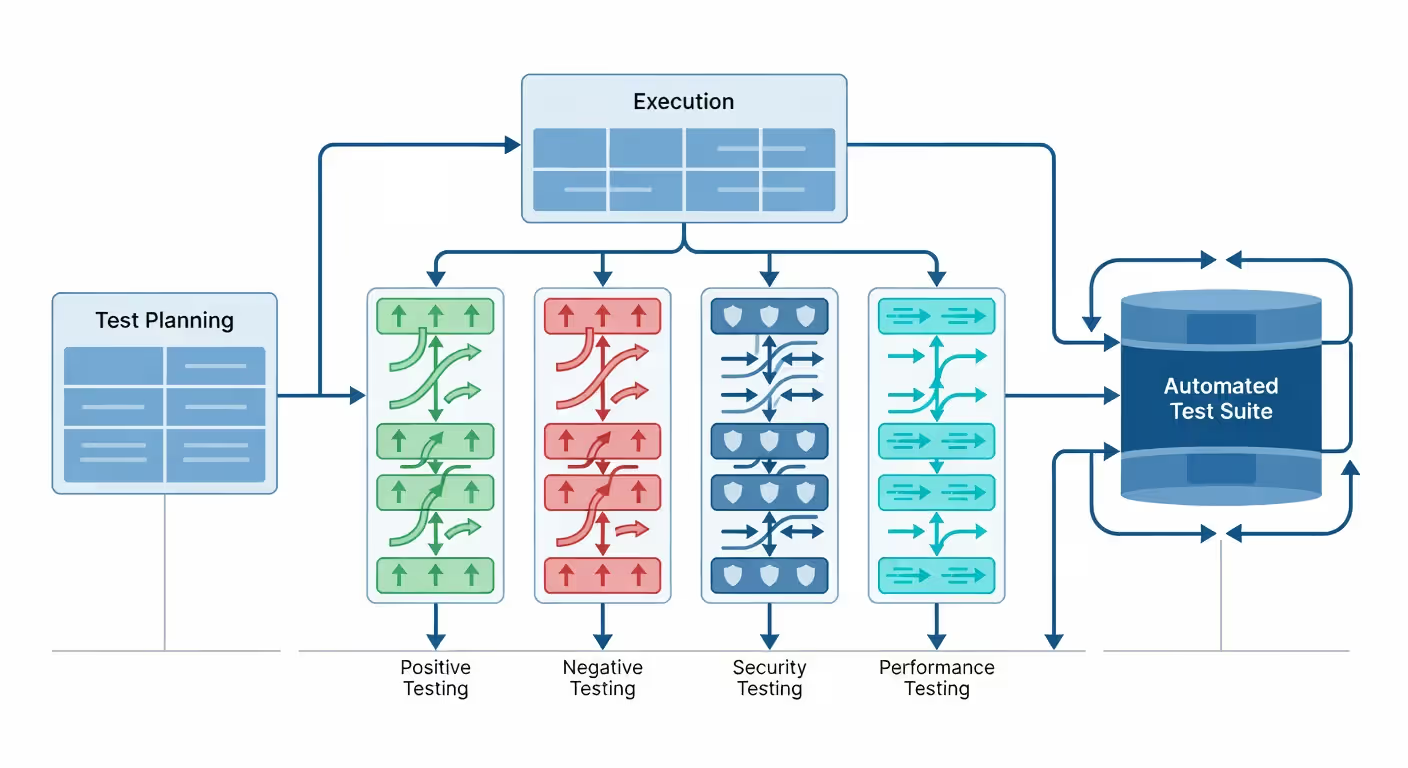
Start with test planning. Don't just write random tests—map out what needs validation. List all endpoints, identify critical business flows, determine acceptable response times, and document expected error scenarios. This upfront work prevents gaps in coverage.
Positive testing verifies that valid inputs produce correct outputs. You test the happy path: properly formatted requests, valid authentication, correct data types, and complete required fields. But positive testing alone misses most bugs.
Negative testing deliberately sends bad data to verify the API handles it gracefully. Send requests with missing required fields, invalid data types, malformed JSON, values outside acceptable ranges, and expired authentication tokens. The API should return meaningful error messages, not crash or expose stack traces.
Boundary testing targets edge cases. Test minimum and maximum values for numeric fields, empty strings versus null values, arrays with zero elements versus thousands of elements, and requests at the exact character limit for text fields. APIs frequently fail at boundaries.
Security testing can't be optional. Test authentication by sending requests without tokens, with expired tokens, and with tokens from different users. Test authorization by attempting to access resources you shouldn't have permission for. Try SQL injection in input fields, script injection in text parameters, and path traversal in file upload endpoints.
Performance testing establishes baselines and identifies degradation. Measure response times for individual endpoints under normal load. Then gradually increase concurrent requests to find the breaking point. Monitor memory usage, CPU utilization, and database connection pools during load tests.
Continuous integration makes API testing effective. Configure your CI/CD pipeline to run API tests on every commit. Fast feedback catches integration issues before they reach QA or production. Most teams run smoke tests (critical paths only) on every commit and full regression suites nightly.
Documentation isn't just nice to have—it's a testing tool. Maintain API documentation that includes example requests, expected responses, and error codes. Use this documentation to generate test cases and keep it updated as the API evolves. Tools like Swagger/OpenAPI can generate basic tests directly from spec files.
Automated API Testing Approaches
Contract testing verifies that APIs maintain their promises to consumers. You define contracts specifying request/response formats, required fields, and data types. Tests validate that both provider and consumer adhere to the contract, preventing breaking changes.
Data-driven testing separates test logic from test data. You write one test script that reads input data and expected results from external files (CSV, JSON, Excel). This approach lets non-programmers create test cases and makes it easy to add coverage without writing new code.
Mocking and stubbing help test APIs that depend on external services. Instead of calling actual third-party APIs (which might be slow, expensive, or unreliable in test environments), you create mock services that return predefined responses. This isolates your tests and makes them faster and more reliable.
Chaining tests creates realistic workflows. After creating a user via POST, use the returned user ID in subsequent tests to update that user, retrieve their profile, or delete them. This approach catches issues that only appear when operations execute in sequence.
Common API Testing Mistakes to Avoid
Testing only happy paths leaves you vulnerable. Most production failures come from unexpected inputs, edge cases, or error conditions you never tested. Allocate at least 40% of your testing effort to negative and boundary scenarios.
Ignoring response times creates performance blind spots. An API that returns correct data but takes 5 seconds to respond will frustrate users and timeout in production. Set performance assertions in your tests: responses under 200ms for simple queries, under 1 second for complex operations.
Hard-coding test data causes flaky tests and maintenance headaches. When you hard-code user IDs, product SKUs, or timestamps, tests break when that data changes or doesn't exist in different environments. Use dynamic data generation or test data management tools.
Skipping cleanup after tests pollutes your test environment. If your test creates a user, order, or database record, delete it when the test completes. Otherwise, subsequent test runs encounter duplicate data errors or unexpected state.
Not testing across environments catches teams by surprise. An API might work perfectly in your local development environment but fail in staging due to configuration differences, network policies, or database versions. Run the same test suite across all environments.
Author: Selena Briarwood;
Source: aleanetwork.net
API Testing Tools Overview
Tool
Ease of Use
Automation Support
Protocols Supported
Pricing Model
Best Use Case
Postman
Very Easy
Moderate (Newman CLI)
REST, GraphQL, WebSocket
Freemium (free tier available)
Manual testing, API exploration, team collaboration
Teams wanting GUI-based automation, cross-protocol testing
FAQ: API Testing Questions Answered
What is the difference between API testing and unit testing?
Unit testing validates individual functions or methods in isolation, typically testing a single code path with mocked dependencies. API testing validates entire endpoints including business logic, data validation, database interactions, and integration with external services. Unit tests run in milliseconds and are written by developers during coding. API tests take longer, cover broader functionality, and can be written by QA engineers or developers. You need both—unit tests catch logic errors early, while API tests verify that integrated components work together correctly.
How long does it take to learn API testing?
You can start basic API testing within a week if you understand HTTP fundamentals and JSON structure. Learning to use Postman for manual testing takes 2-3 days of hands-on practice. Building automated test suites requires programming knowledge and typically takes 4-6 weeks to reach proficiency with a framework like REST Assured or Requests. Advanced topics like performance testing, security testing, and contract testing add another 2-3 months. Most people become productive with core API testing within a month of focused learning and practice.
Can I do API testing without coding knowledge?
Yes, for manual testing. Tools like Postman, Insomnia, and SoapUI provide graphical interfaces where you can build requests, send them, and validate responses without writing code. You can create basic test collections and run them repeatedly. However, automation requires at least basic scripting skills. Postman's test scripts use JavaScript, and most automation frameworks require familiarity with languages like Java, Python, or JavaScript. You'll hit limitations quickly without coding skills—data-driven testing, complex assertions, and CI/CD integration all require programming knowledge.
What is the best tool for beginners in API testing?
Postman is the best starting point for beginners. It offers an intuitive interface, extensive documentation, active community support, and a gentle learning curve. You can send requests, examine responses, organize tests into collections, and write basic assertions without any coding. The free tier includes everything beginners need. Once you're comfortable with API concepts in Postman, transitioning to automation frameworks becomes much easier because you understand request structure, headers, authentication, and response validation.
How do you test API security?
Start by testing authentication—verify that endpoints reject requests without valid credentials and that token expiration works correctly. Test authorization by attempting to access resources with insufficient permissions or manipulated user identifiers. Try SQL injection in input parameters, cross-site scripting in text fields, and XML external entity attacks if the API accepts XML. Test for data exposure by checking error messages for sensitive information and verifying that responses don't leak data users shouldn't see. Use tools like OWASP ZAP or Burp Suite to scan for common vulnerabilities, and always test with HTTPS to ensure encrypted transmission.
What are the most common API testing challenges?
Authentication complexity tops the list—managing tokens, handling refresh flows, and dealing with different auth schemes across environments creates significant overhead. Test data management causes constant friction when tests depend on specific database states that change between runs. Environment differences mean tests passing locally but failing in CI/CD due to configuration mismatches or network restrictions. Asynchronous operations make testing difficult when APIs trigger background jobs or webhook callbacks that complete after the initial response. Versioning creates maintenance burden when you need to test multiple API versions simultaneously. The solution involves better test architecture, containerized test environments, and robust test data strategies.
API testing isn't just a quality gate—it's how you build confidence in your system's core functionality. Start small with manual testing to understand your APIs, then gradually automate the critical paths. Focus on realistic scenarios, test the unhappy paths as rigorously as the happy ones, and integrate testing into your development workflow. The upfront investment in solid API testing pays dividends every time you deploy with confidence instead of anxiety.
Regression testing prevents code changes from breaking existing functionality. This guide covers regression test types, manual vs. automated approaches, building effective test suites, and implementing regression testing in agile and CI/CD environments.
Discover how DevOps automation transforms software delivery through automated pipelines, CI/CD tools, and intelligent deployment strategies. Learn which tools to use, how to implement continuous deployment, and best practices that reduce errors while accelerating releases.
Discover how generative AI is changing software development in practice. This guide covers workflow integration, code quality concerns, tool comparisons, and real-world implementation strategies for development teams looking to adopt AI coding assistants effectively.
Low code platforms let teams build applications using visual interfaces and pre-built components instead of writing extensive code. This guide explains how low code development works, who uses it, key benefits and limitations, and how to choose the right platform for your needs.
The content on this website is provided for general informational and educational purposes only. It is intended to explain concepts related to AI tools, agents, developer infrastructure, coding assistants, APIs, and productivity workflows.
All information on this website, including articles, guides, and examples, is presented for general educational purposes. Outcomes and tool performance may vary depending on implementation, skill level, and use case.
This website does not provide professional AI consulting, development services, or guarantees of results, and the information presented should not be used as a substitute for consultation with qualified AI or software development professionals.
The website and its authors are not responsible for any errors or omissions, or for any outcomes resulting from decisions made based on the information provided on this website.