Software teams today ship code faster than ever. But speed without reliability means nothing. That's where devops automation comes in—turning repetitive manual tasks into consistent, repeatable processes that run themselves. Instead of engineers clicking through deployment checklists at midnight, automated pipelines handle testing, integration, and deployment while your team sleeps. The result? Fewer errors, faster releases, and developers who actually focus on building features instead of babysitting infrastructure.
What Is DevOps Automation and Why It Matters
DevOps automation means using software tools to handle the repetitive tasks in your development and operations workflow. Think code testing, server provisioning, deployment, monitoring—anything you'd otherwise do manually.
The core idea is simple. You write the instructions once, and the system executes them every time. No variation. No forgotten steps.
Manual DevOps processes rely on human memory and discipline. Someone has to remember to run tests, check dependencies, update configurations, and deploy in the right order. That works fine for a team of three shipping once a month. It breaks down completely at scale.
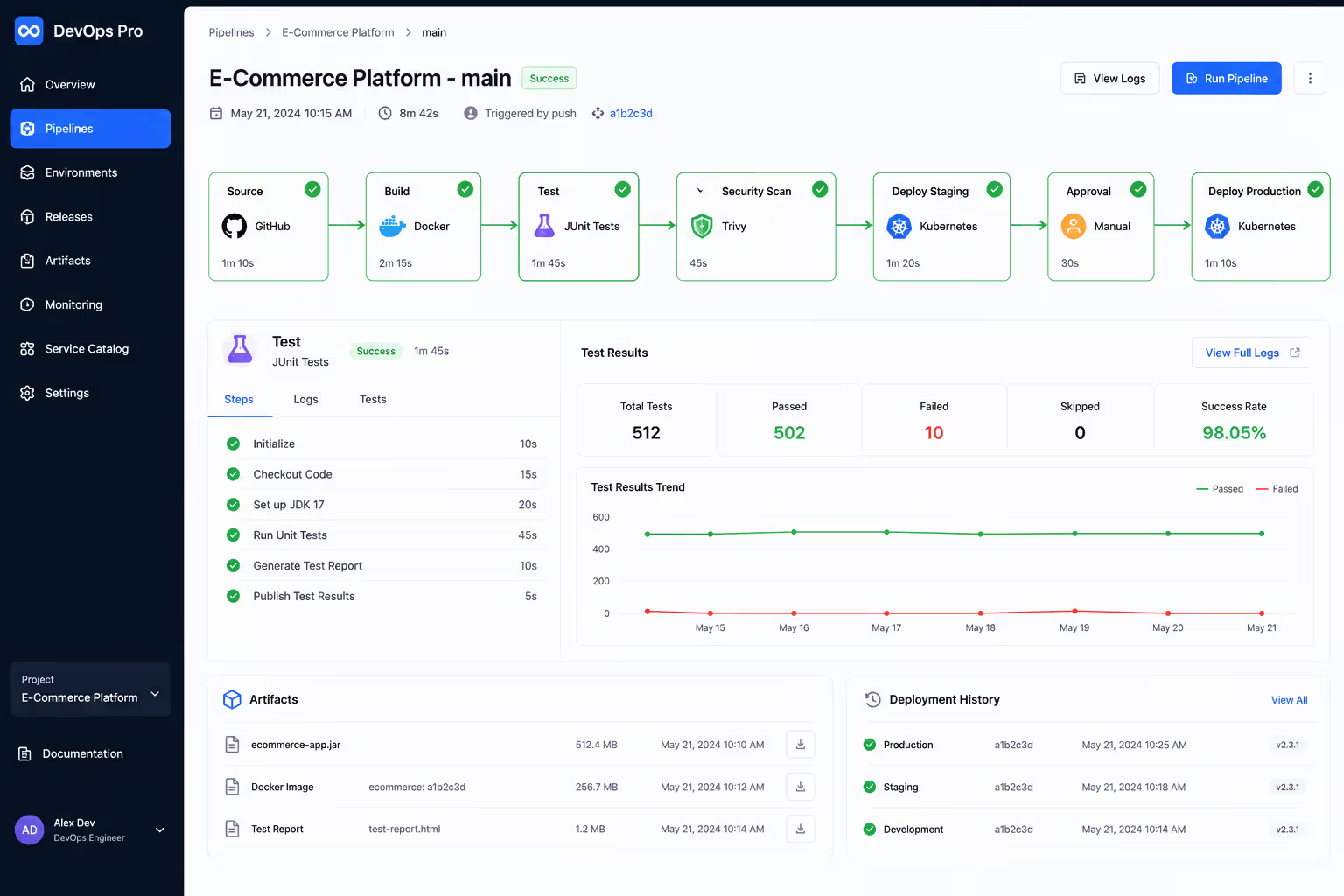
Automated devops pipeline systems eliminate that human bottleneck. When a developer pushes code, the pipeline automatically runs unit tests, integration tests, security scans, builds containers, and deploys to staging—all without anyone touching a button.
The benefits show up immediately in three areas:
Speed. Automated processes run in minutes, not hours. What took a full afternoon of manual steps now completes during a coffee break.
Consistency. Machines don't skip steps or make typos. Every deployment follows the exact same process, whether it's the first of the day or the fiftieth.
Dependability. Your testing infrastructure identifies defects during the build phase rather than after customers encounter them. When production issues occur, automated recovery procedures kick in immediately. Teams report significantly fewer emergency incidents during off-hours.
But here's what most guides won't tell you: automation doesn't fix broken processes. It makes them faster and more consistent—which means a bad manual process becomes a bad automated process that fails more efficiently. You need to fix your workflow first, then automate it.
The pattern I see most often is teams rushing to automate everything at once, then spending months debugging their automation tools instead of shipping features. Start small. Automate your build process first, then testing, then deployment. Each step proves itself before you add the next layer.
Author: Selena Briarwood;
Source: aleanetwork.net
How Automated DevOps Pipelines Work
An automated devops pipeline is a series of connected stages that code passes through on its way from a developer's laptop to production servers. Each stage performs specific tasks and decides whether the code moves forward or gets rejected.
Here's the typical flow:
Source stage. A developer commits code to version control (GitHub, GitLab, Bitbucket). This commit triggers the pipeline automatically. No manual intervention needed.
Build stage. The system pulls the latest code, compiles it, and packages it into a deployable format. Container-based applications get packaged into Docker images with all their dependencies bundled together. Traditional applications might become JAR files, executables, or deployment packages depending on the technology stack.
Test stage. Automated tests run against the built code. Your unit-level tests validate individual functions and methods. Integration-level tests ensure different components communicate correctly. End-to-end tests simulate real user interactions. If any test fails, the pipeline stops here.
Security stage. Scanners check for vulnerabilities in dependencies, code quality issues, and potential security flaws. Tools like Snyk or SonarQube flag problems before they reach production.
Deploy to staging. If all tests pass, the code deploys to a staging environment that mirrors production. This is where QA teams or automated smoke tests do final verification.
Deploy to production. After staging approval (which can be manual or automated based on test results), the code rolls out to production servers. This might happen gradually through canary deployments or blue-green switches.
The triggering mechanism matters more than most teams realize. You've got three main options:
Commit-based triggers fire every time someone pushes code. Fast feedback, but you'll run a lot of pipelines. Schedule-based triggers run at set times—nightly builds, for example. Slower feedback, but more efficient for resource-heavy processes. Manual triggers give humans control over when pipelines run, useful for production deployments that need oversight.
Smart teams use all three. Commit triggers for fast tests, scheduled triggers for comprehensive security scans, manual triggers for production releases.
Integration points connect your pipeline to external systems. Your pipeline needs to talk to version control, artifact repositories, container registries, cloud providers, monitoring tools, and notification systems. Each integration adds complexity but also capability.
A common mistake? Building pipelines with too many integration points upfront. Start with the basics—version control, build tool, and deployment target. Add monitoring and advanced testing later once the foundation works reliably.
DevOps Automation Tools You Should Know
The devops automation tools overview landscape is crowded. Hundreds of tools promise to solve your automation problems. But they fall into a few clear categories, and you only need one or two from each.
CI/CD Platforms
These handle the core pipeline logic—running tests, building artifacts, orchestrating deployments.
Jenkins remains the most flexible option. Open source, plugin-rich, runs anywhere. But that flexibility means complexity. You'll spend time maintaining Jenkins itself.
GitLab CI/CD integrates directly with GitLab repositories. If you're already using GitLab for version control, this is the simplest path. Configuration lives in a .gitlab-ci.yml file in your repo.
GitHub Actions works the same way for GitHub users. Workflows defined in YAML, massive marketplace of pre-built actions, generous free tier for open source projects.
CircleCI and Travis CI offer cloud-hosted CI/CD with minimal setup. Perfect for teams wanting to skip the infrastructure management overhead entirely.
Azure DevOps and AWS CodePipeline make sense if you're already deep in those cloud ecosystems. Native integration with other Azure or AWS services reduces friction.
The simpler option usually wins here. If your code lives in GitHub, start with GitHub Actions. If you need complex custom workflows that don't fit standard patterns, Jenkins gives you that power.
Configuration and Infrastructure Tools
These manage servers, containers, and cloud resources through code.
Terraform defines infrastructure as code across multiple cloud providers. You write declarative configurations describing what you want, and Terraform figures out how to create it. Compatible with major providers including AWS, Azure, GCP, and over a hundred specialized platforms.
Ansible handles configuration management and application deployment. Agentless architecture means you don't install software on target servers. Your desired system states get defined in YAML playbook files that Ansible executes.
Kubernetes orchestrates containers at scale. Not strictly a DevOps tool, but it's become the standard platform for running containerized applications. Manages deployment, scaling, networking, and self-healing.
Docker packages applications into containers that run consistently across environments. Solves the "works on my machine" problem by bundling code, dependencies, and configuration together.
Pulumi offers an alternative to Terraform using real programming languages (TypeScript, Python, Go) instead of domain-specific languages. Better for teams that prefer coding over configuration files.
Author: Selena Briarwood;
Source: aleanetwork.net
Monitoring and Testing Tools
These watch your systems and validate that everything works.
Prometheus collects metrics from applications and infrastructure. Open source, designed for reliability, integrates well with Kubernetes.
Grafana visualizes those metrics in customizable dashboards. Pairs naturally with Prometheus but works with many data sources.
Selenium automates browser testing for web applications. Simulates real user interactions to catch UI bugs.
JUnit (Java), pytest (Python), Jest (JavaScript)—language-specific testing frameworks that run unit and integration tests.
Datadog and New Relic provide commercial monitoring platforms with everything bundled: metrics, logs, traces, alerting, and dashboards. Costly but feature-complete solutions.
Here's how the most popular automation tools compare across key dimensions:
Tool Name
Primary Function
Best For
Pricing Model
Integration Capability
GitHub Actions
CI/CD orchestration
GitHub-based projects
Free tier plus usage billing
Deep GitHub ecosystem connections
Jenkins
CI/CD orchestration
Customized workflows, self-hosted needs
Free open-source license
Massive plugin ecosystem available
Terraform
Infrastructure as code
Multi-cloud resource management
Free open-source license
Over 100 provider integrations
Kubernetes
Container orchestration
Large-scale containerized systems
Free open-source license
Native container platform support
Ansible
Configuration management
Server setup and application deployment
Free open-source license
Wide platform compatibility
Datadog
Monitoring platform
Complete observability requirements
Per-host subscription pricing
600+ tool integrations
Setting Up Continuous Deployment Automation
Continuous deployment automation takes code that passes your entire test suite and pushes it directly to production without requiring human approval. It represents the most advanced form of devops pipeline automation, and it's not suitable for every organization.
Let's be clear about the difference. Continuous delivery means your code is always ready to deploy—but a human decides when. Continuous deployment removes that human gate. Every successful build ships.
Most teams should start with continuous delivery and graduate to continuous deployment once they trust their automated testing.
Here's how to implement it step by step:
Step 1: Lock down your version control workflow. Require pull requests for all changes. Enforce code reviews. Protect your main branch from direct commits. This creates a quality gate before code enters the pipeline.
Step 2: Build comprehensive automated tests. You need unit tests covering core logic, integration tests verifying components work together, and end-to-end tests checking critical user paths. Aim for 80% code coverage minimum. If your tests don't catch bugs reliably, continuous deployment will just ship bugs faster.
Step 3: Create identical staging and production environments. Use the same infrastructure code, same container images, same configurations. The only difference should be scale and data. This ensures staging actually tests what will run in production.
Step 4: Implement deployment strategies that minimize risk. Blue-green approaches keep two identical production setups running, letting you instantly switch traffic between them. Canary strategies expose new versions to just a small user subset initially. Rolling approaches gradually swap old instances for new ones across your infrastructure. Pick the strategy that matches your risk tolerance and infrastructure.
Step 5: Configure automated rollback triggers. Monitor error rates, response times, and key business metrics. If any cross a threshold after deployment, automatically roll back to the previous version. This automatic safety mechanism makes continuous deployment practical.
Step 6: Handle environment-specific settings properly. Environment variables or dedicated configuration management systems should control differences between staging and production. Never hard-code environment-specific values.
Security considerations can't be afterthoughts. Every pipeline stage needs security controls:
Scan dependencies for known vulnerabilities before building.
Implement dedicated secrets management platforms like HashiCorp Vault or AWS Secrets Manager rather than embedding credentials in code.
Implement least-privilege access—pipeline tools should only have permissions they actually need.
Cryptographically sign your container images and validate those signatures during deployment.
Audit all pipeline activities and store logs for compliance.
A common mistake is treating security as a final gate before production. That's too late. Security checks should run early and often throughout the pipeline. Find vulnerabilities during the build stage, not during deployment.
The best measure of engineering efficiency is not how fast you can ship features, but how quickly you can recover from failures. Automation gives you both speed and resilience, but only if you build the safety mechanisms first.
— Gene Kim
DevOps Automation Best Practices
Testing strategies make or break automation success. Here's what works:
Test at multiple levels. Your testing pyramid needs a broad base of fast unit tests, a middle layer of integration tests, and a small set of end-to-end tests at the top. Each layer catches different problems. Relying only on unit tests means integration bugs slip through. Only end-to-end tests means slow feedback and unclear failure causes.
Run fast tests first. Structure your pipeline so quick unit tests run before slow integration tests. Developers get feedback in seconds for common errors, not minutes. Save the expensive end-to-end tests for after everything else passes.
Maintain test environments that mirror production. Use containers or infrastructure-as-code to ensure consistency. If your production runs on Kubernetes but tests run on bare metal, you're not testing what matters.
Version control standards prevent chaos:
Everything goes in version control. Code, obviously. But also infrastructure definitions, pipeline configurations, test scripts, deployment manifests, and documentation. If it affects how your system runs, it belongs in Git.
Use meaningful commit messages. "Fixed bug" tells you nothing. "Fixed race condition in payment processing queue" tells you exactly what changed and why. Future you will appreciate the context.
Tag releases consistently. Semantic versioning (major.minor.patch) communicates what changed. A jump from 1.2.3 to 2.0.0 signals breaking changes. A jump to 1.2.4 signals a small fix.
Documentation requirements sound boring but save enormous time:
Document your pipeline stages. What does each stage do? What tools does it use? What does success look like? New team members should understand the pipeline without asking questions.
Maintain runbooks for common failures. When the deployment fails at 2 a.m., a runbook that says "check the database connection pool settings" beats searching through Slack history.
Keep architecture decision records. Why did you choose Jenkins over GitHub Actions? Why Terraform instead of Pulumi? Future teams need that context when evaluating changes.
Team collaboration patterns determine whether automation helps or hinders:
Shared ownership of the pipeline. Don't make it the ops team's problem. Developers should understand and improve the pipeline. Ops should understand and improve the application. Breaking down silos is the whole point of DevOps.
Blameless post-mortems after failures. When automation fails, figure out why the process allowed it, not who caused it. Fix the process.
Regular pipeline maintenance. Dependency updates, security patches, performance tuning—schedule time for this. Neglected pipelines accumulate technical debt just like applications.
Common mistakes to avoid:
Over-automating too early. Start with the most painful manual tasks. Automate those. Then move to the next pain point. Don't try to automate everything on day one.
Ignoring pipeline performance. A pipeline that takes 45 minutes to run won't get used. Developers will find workarounds. Keep feedback loops fast—under 10 minutes for typical changes.
Treating automation as "set and forget." Your pipeline needs maintenance. Tools update. Requirements change. Security threats evolve. Budget time for pipeline improvements.
Skipping local testing. Developers should be able to run the same tests locally that run in the pipeline. Waiting for the CI system to catch basic errors wastes time.
Author: Selena Briarwood;
Source: aleanetwork.net
AI in DevOps Automation
AI devops automation explained boils down to using machine learning to make your automation smarter. Instead of following rigid rules, AI-enhanced tools learn patterns and adapt.
Here's where AI actually helps right now:
Predictive failure analysis. Traditional monitoring alerts you when something breaks. AI systems analyze patterns in logs, metrics, and deployment history to predict failures before they happen. If error rates creep up gradually or memory usage trends upward, AI flags it early.
Intelligent test selection. Running every test on every commit takes time. AI analyzes code changes and test history to determine which tests are most likely to catch issues for a given change. Run those first. This speeds up pipelines without sacrificing coverage.
Automated root cause analysis. When a deployment fails, AI tools correlate logs, metrics, and events to identify likely causes. Instead of manually searching through thousands of log lines, you get a shortlist of probable issues.
Capacity planning and resource optimization. AI models learn your application's resource usage patterns and predict future needs. This helps right-size infrastructure, preventing both over-provisioning (wasted money) and under-provisioning (performance issues).
Security threat detection. AI-powered security tools identify unusual patterns that might indicate breaches or vulnerabilities. They learn what normal looks like for your systems and flag deviations.
AIOps tools bring these capabilities together in platforms designed for operations teams:
Moogsoft uses AI to reduce alert noise by correlating related alerts into single incidents. Instead of 50 alerts from a cascading failure, you get one incident with context.
Dynatrace applies AI to application performance monitoring, automatically detecting anomalies and identifying root causes without manual threshold configuration.
BigPanda aggregates alerts from multiple monitoring tools and uses machine learning to identify patterns and prioritize incidents.
But let's be realistic about limitations. AI isn't magic. It needs data to learn from, which means it works best for established systems with history. New applications don't have patterns yet.
AI also introduces opacity. When a rule-based system makes a decision, you can trace exactly why. When an AI model makes a decision, the reasoning might be unclear. That's fine for test selection. It's concerning for security decisions.
The future trends point toward more autonomous systems. We're moving from "automation that follows scripts" to "automation that learns and adapts." Expect to see:
Self-healing systems that detect, diagnose, and fix common issues without human intervention.
Intelligent deployment strategies that automatically choose canary, blue-green, or rolling updates based on risk assessment.
Code generation tools that write test cases and infrastructure definitions based on application requirements.
Predictive scaling that adjusts resources before load spikes hit, based on learned patterns.
One thing I've noticed: teams that succeed with AI in DevOps start small. They pick one specific problem—maybe alert fatigue or test selection—and apply AI there. They learn how it works, build trust, then expand. Teams that try to implement AI everywhere at once usually end up with expensive tools they don't understand and don't trust.
Author: Selena Briarwood;
Source: aleanetwork.net
DevOps Automation Tools Comparison
Tool Name
Primary Function
Best For
Pricing Model
Integration Capability
GitHub Actions
CI/CD orchestration
GitHub-based projects
Free tier plus usage billing
Deep GitHub ecosystem connections
Jenkins
CI/CD orchestration
Customized workflows, self-hosted needs
Free open-source license
Massive plugin ecosystem available
GitLab CI/CD
CI/CD orchestration
GitLab users seeking unified platform
Free tier plus subscription options
Native GitLab ecosystem integration
Terraform
Infrastructure as code
Multi-cloud resource management
Free open-source license
Over 100 provider integrations
Kubernetes
Container orchestration
Large-scale containerized systems
Free open-source license
Native container platform support
Ansible
Configuration management
Server setup and application deployment
Free open-source license
Wide platform compatibility
Datadog
Monitoring platform
Complete observability requirements
Per-host subscription pricing
600+ tool integrations
Prometheus
Metrics collection
Kubernetes monitoring needs
Free open-source license
Strong Kubernetes ecosystem ties
FAQ: DevOps Automation Questions Answered
What is the difference between DevOps automation and CI/CD?
DevOps automation encompasses the broader practice of using tools to handle repetitive tasks across your entire development and operations workflow. CI/CD (Continuous Integration/Continuous Delivery) represents a specific subset of DevOps automation that focuses exclusively on building, testing, and deploying code. Think of CI/CD as one component within the larger DevOps automation landscape. You can automate infrastructure provisioning, monitoring, and incident response without implementing CI/CD, though most teams begin their automation journey with CI/CD since it delivers immediate, measurable value in faster deployments and fewer manual errors.
How much does DevOps automation cost to implement?
The cost varies wildly based on your choices. Open-source tools like Jenkins, Terraform, and Kubernetes are free to use, but you'll pay for the infrastructure to run them and the engineering time to set them up and maintain them. Cloud-hosted CI/CD services like GitHub Actions or CircleCI charge based on usage—typically $10 to $100 per month for small teams, scaling up with usage. Commercial monitoring and AIOps platforms can run $15 to $30 per host per month. For a small team of five developers, expect to spend $200 to $500 monthly on tools plus significant upfront engineering time. Larger organizations might spend thousands monthly but save far more in reduced downtime and faster delivery.
Can small teams benefit from DevOps automation?
Absolutely. Small teams actually benefit more in some ways because automation multiplies their limited resources. A three-person team can't afford someone manually deploying code at midnight. Automated pipelines let them ship updates during business hours with confidence. Start simple—automate your build and test process first, then add deployment automation once that's stable. You don't need enterprise-grade tools. GitHub Actions or GitLab CI/CD free tiers handle most small team needs. The key is starting small and expanding gradually rather than trying to implement everything at once.
What skills are needed to manage automated DevOps pipelines?
You need a mix of development and operations knowledge. On the development side: version control (Git), scripting (Python, Bash, or similar), and understanding of your application's build process. On the operations side: basic Linux administration, networking concepts, and cloud platform familiarity (AWS, Azure, or Google Cloud). You'll also need to learn specific tools—Docker for containerization, Kubernetes for orchestration, Terraform for infrastructure as code. The good news is you don't need to master everything. Start with Git and one CI/CD platform. Add skills as you expand your automation. Most teams cross-train developers and ops engineers so knowledge spreads across the team.
How long does it take to automate a DevOps pipeline?
For a basic CI/CD pipeline—build, test, and deploy to a single environment—expect one to two weeks for a team new to automation. That includes learning the tools, writing configuration files, and debugging initial issues. A more comprehensive pipeline with multiple environments, security scanning, and advanced deployment strategies might take one to three months. But you don't build everything at once. Start with automated builds and tests in week one. Add staging deployment in week two. Production deployment in week three. Security scanning in week four. Each increment delivers value while you're building the next piece. The mistake is waiting to launch until everything is perfect. Launch basic automation quickly, then improve it.
Which DevOps automation tool is best for beginners?
If your code lives in GitHub, start with GitHub Actions. If you use GitLab, start with GitLab CI/CD. Both offer generous free tiers, excellent documentation, and tight integration with version control. The configuration lives in a YAML file in your repository, making it easy to version and share. For infrastructure automation, Terraform has become the standard—it's powerful enough for complex needs but simple enough for beginners to grasp. For containerization, Docker is the clear starting point. Learn these three (your Git platform's CI/CD, Terraform, and Docker) and you'll have a solid foundation for most automation needs.
DevOps automation transforms how teams build and ship software, but it's not a magic solution you install and forget. The tools matter less than the processes they automate and the culture that embraces them. Start small, focus on solving your most painful manual tasks first, and build trust in automation before expanding. Your goal isn't to automate everything—it's to automate the right things so your team can focus on work that actually requires human creativity and judgment.
Regression testing prevents code changes from breaking existing functionality. This guide covers regression test types, manual vs. automated approaches, building effective test suites, and implementing regression testing in agile and CI/CD environments.
Discover how generative AI is changing software development in practice. This guide covers workflow integration, code quality concerns, tool comparisons, and real-world implementation strategies for development teams looking to adopt AI coding assistants effectively.
Low code platforms let teams build applications using visual interfaces and pre-built components instead of writing extensive code. This guide explains how low code development works, who uses it, key benefits and limitations, and how to choose the right platform for your needs.
Master API testing with this comprehensive guide covering testing methods, popular tools, REST API tutorials, and best practices. Learn how to test APIs effectively, automate your testing workflow, and avoid common mistakes that compromise software quality.
The content on this website is provided for general informational and educational purposes only. It is intended to explain concepts related to AI tools, agents, developer infrastructure, coding assistants, APIs, and productivity workflows.
All information on this website, including articles, guides, and examples, is presented for general educational purposes. Outcomes and tool performance may vary depending on implementation, skill level, and use case.
This website does not provide professional AI consulting, development services, or guarantees of results, and the information presented should not be used as a substitute for consultation with qualified AI or software development professionals.
The website and its authors are not responsible for any errors or omissions, or for any outcomes resulting from decisions made based on the information provided on this website.